Modern PHP: Embracing Asynchronous Programming with ReactPHP and AmPHP
PHP is often seen as purely synchronous, but modern libraries like ReactPHP and AmPHP unlock powerful asynchronous capabilities. This post dives into how event loops enable non-blocking I/O for high-performance applications.
PHP has come a long way. For years, the narrative around PHP often centered on its synchronous, blocking nature, perfectly suited for the classic request-response cycle of web applications. You'd hit a URL, PHP would execute your script from top to bottom, fetch data from a database, call an external API, render some HTML, and then die. It was simple, effective, and powered a significant chunk of the internet.
But the demands on modern backend systems have evolved. We're now building applications that need to handle thousands of concurrent users, maintain real-time WebSocket connections, process streams of data, and act as intelligent proxies for a multitude of external services. In these scenarios, the traditional 'execute-and-wait' model quickly becomes a bottleneck.
This is where asynchronous programming steps in. While often associated with JavaScript's Node.js or Python's asyncio, PHP has also matured significantly in this space. Modern PHP, through powerful libraries like ReactPHP and AmPHP, allows developers to build high-performance, non-blocking applications, fundamentally changing how we approach I/O-bound workloads. This isn't just about making your web requests faster; it's about enabling entirely new classes of applications in PHP.
The Synchronous Bottleneck: Why Traditional PHP Stumbles at Scale
Let's be clear: traditional synchronous PHP is excellent for many tasks. When a web server (like Apache with mod_php or Nginx with FPM) receives a request, it typically spawns a new PHP process (or reuses one from a pool) to handle that request. This process then executes your script.
Consider a typical web request that needs to fetch user data from a database and then make a call to an external payment gateway API. In a synchronous model, your script would look something like this:
<?php

// Simulate database call
function fetchUserData(int $userId): array
{
    echo "[SYNCHRONOUS] Fetching user data for user ID: {$userId}...\n";
    sleep(2); // Simulate network/database latency
    echo "[SYNCHRONOUS] User data fetched.\n";
    return ['id' => $userId, 'name' => 'Ansh Gautam', 'email' => 'ansh@example.com'];
}

// Simulate external API call
function processPayment(array $userData, float $amount): string
{
    echo "[SYNCHRONOUS] Processing payment for user {$userData['name']}...\n";
    sleep(3); // Simulate external API latency
    echo "[SYNCHRONOUS] Payment processed.\n";
    return 'TXN_123456789';
}

$start = microtime(true);

$userId = 123;
$userData = fetchUserData($userId);
$transactionId = processPayment($userData, 99.99);

echo "[SYNCHRONOUS] All operations completed. Transaction ID: {$transactionId}\n";
printf("[SYNCHRONOUS] Total execution time: %.2f seconds\n", microtime(true) - $start);

?>
If you run this, you'll see a total execution time of approximately 5 seconds (2s for DB + 3s for API). While these operations are happening, the PHP process is blocking. It's sitting idle, waiting for the I/O operation (network request to DB, network request to API) to complete. It cannot perform any other useful work.
In a highly concurrent environment, if you have 100 such requests hitting your server simultaneously, you'd ideally want to handle them without 100 separate processes each waiting 5 seconds. Each waiting process consumes memory and CPU cycles, quickly exhausting server resources and leading to slow response times or even crashes under heavy load. This is the core problem asynchronous PHP aims to solve.
Understanding Asynchronous Programming and the Event Loop
Asynchronous programming is about performing non-blocking operations. Instead of waiting for an I/O operation to finish, you tell the system: "Start this operation, and when it's done, call this specific function (a callback) with the result." In the meantime, your program can continue doing other work.
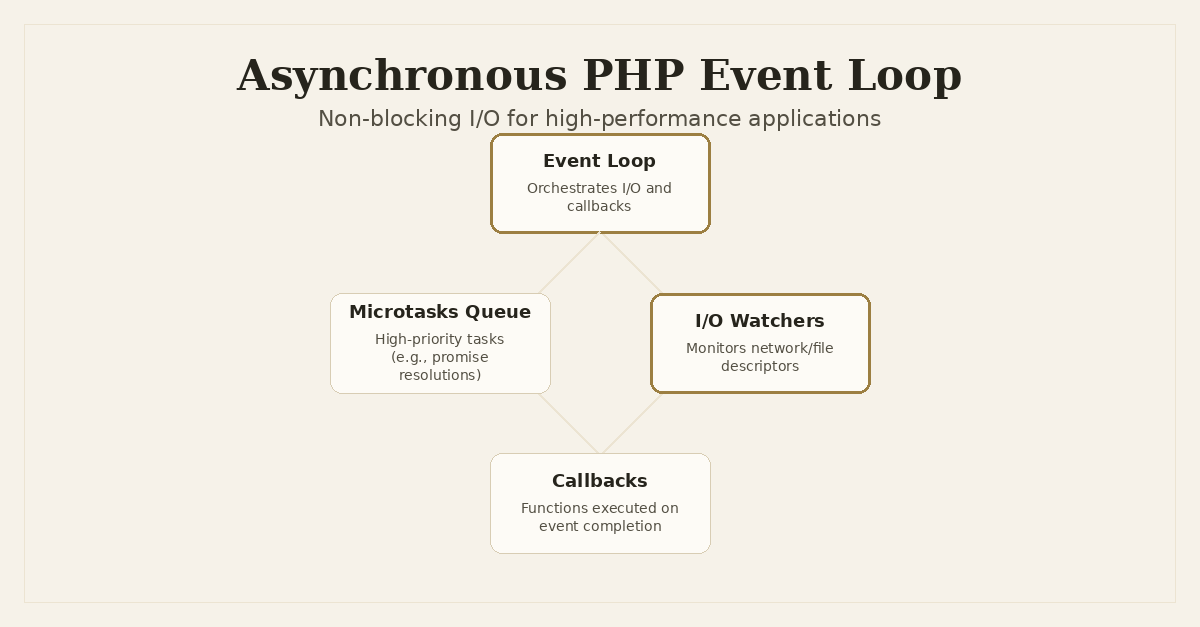
The orchestrator of this non-blocking dance is the Event Loop. Think of it as a central dispatcher that continuously monitors for events (like a network connection becoming readable, a file finishing writing, or a timer expiring) and dispatches the appropriate callback functions when those events occur. The event loop is typically single-threaded, meaning it processes one event and its associated callback at a time, but it does so extremely rapidly.
This single-threaded nature is critical. Unlike multi-threading, where multiple threads genuinely execute code in parallel (or appear to, on multi-core CPUs), the event loop manages concurrency through efficient I/O handling, not true parallelism of CPU-bound tasks. For PHP, which historically lacks robust, userland multi-threading primitives (apart from extensions like pthreads which come with their own complexities), the event loop model is a natural and highly effective fit for I/O-bound problems.
PHP 8.1 introduced Fibers, a significant step towards enabling clearer asynchronous code natively. Fibers are essentially resumable functions that allow you to pause execution and then resume it later. While they don't provide an event loop themselves, they make it much easier for asynchronous libraries to offer async/await-like syntax, allowing developers to write non-blocking code that looks synchronous.
ReactPHP: The Event-Driven Foundation
ReactPHP is a collection of decoupled libraries that provide a foundation for event-driven programming in PHP. It's not a single framework but a set of components that work together, centered around its EventLoop component.
Key components of ReactPHP:
react/event-loop: The heart. It's responsible for managing timers, stream I/O, and deferred tasks. It supports various loop implementations (libuv,libevent, or PHP's nativestream_select).react/stream: Provides an interface for non-blocking I/O streams, allowing you to read from and write to sockets, files, etc., without blocking the event loop.react/socket: Builds onreact/streamto provide non-blocking TCP/UDP server and client implementations.react/http: An HTTP client and server built on top ofreact/socket, enabling high-performance web applications or API gateways.react/promise: A Promises/A+ compliant implementation for handling asynchronous results in a structured way, avoiding callback hell.
Let's look at a simple ReactPHP TCP echo server. This server will listen for incoming connections and simply echo back whatever data it receives. Crucially, it will handle multiple concurrent connections without blocking.
<?php

require 'vendor/autoload.php';

use React\EventLoop\Factory;
use React\Socket\Server;
use React\Socket\ConnectionInterface;

// Create an event loop instance
$loop = Factory::create();

// Create a TCP server on port 8000
$socket = new Server('0.0.0.0:8000', $loop);

echo "Listening on {$socket->getAddress()}\n";

// When a new connection comes in
$socket->on('connection', function (ConnectionInterface $conn) {
    echo "Client connected: {$conn->getRemoteAddress()}\n";

    // When data is received from this connection
    $conn->on('data', function ($data) use ($conn) {
        echo "Received from {$conn->getRemoteAddress()}: {$data}";
        // Echo the data back to the client
        $conn->write("Echo: {$data}");
    });

    // When the connection closes
    $conn->on('close', function () use ($conn) {
        echo "Client disconnected: {$conn->getRemoteAddress()}\n";
    });

    // Handle errors on the connection
    $conn->on('error', function (\Exception $e) use ($conn) {
        echo "Connection error for {$conn->getRemoteAddress()}: {$e->getMessage()}\n";
    });
});

// Handle errors on the server itself (e.g., port already in use)
$socket->on('error', function (\Exception $e) {
    echo "Server error: {$e->getMessage()}\n";
});

// Start the event loop
$loop->run();

?>
To run this, you'd need composer require react/socket. Once running, you can connect to it with netcat or telnet from multiple terminals concurrently. Each connection is handled by the same PHP process, asynchronously. The on('data') and on('close') callbacks are only invoked when an event occurs, allowing the loop to manage many connections efficiently without blocking.
AmPHP: Modern Asynchronous Primitives and Fibers
AmPHP is another comprehensive asynchronous framework for PHP, often seen as a more modern alternative to ReactPHP, especially with its strong integration of PHP 8.1+ Fibers. AmPHP aims to provide a complete ecosystem for building asynchronous applications.
Key features of AmPHP:
Amp\Loop(nowAmp\Runtime): The event loop implementation, similar to ReactPHP's, but often leveraging Fibers for internal scheduling.Amp\Promise/Amp\Future: Core primitives for managing asynchronous operations.Futureis a newer, more ergonomic type for representing a value that will be available in the future.Amp\Http\Client: A powerful, non-blocking HTTP client for making concurrent requests.Amp\Websocket: Components for building WebSocket servers and clients.Amp\Parallel: Tools for executing CPU-bound tasks in separate processes without blocking the main event loop.
AmPHP's strength lies in its async/await-like syntax made possible by PHP Fibers. This allows you to write asynchronous code that reads almost like synchronous code, greatly improving readability and maintainability compared to deeply nested callbacks.
Let's demonstrate AmPHP by fetching multiple URLs concurrently using its HTTP client:
<?php

require 'vendor/autoload.php';

use Amp\Future;
use Amp\Http\Client\HttpClientBuilder;
use Amp\Http\Client\Request;

// This function is marked 'async' thanks to AmPHP and Fibers.
// It can use 'await' internally.
async function fetchUrl(string $url): string
{
    $client = HttpClientBuilder::buildDefault();
    $request = new Request($url);

    echo "[ASYNC] Fetching {$url}...\n";

    // 'await' pauses this fiber until the HTTP request completes,
    // but the event loop continues processing other tasks.
    $response = await $client->request($request);
    $body = await $response->getBody()->buffer();

    echo "[ASYNC] Finished {$url} (Status: {$response->getStatus()}).\n";

    return $body;
}

// The main entry point for our asynchronous application
Amp\async(function () {
    $start = microtime(true);

    $urls = [
        'https://httpbin.org/delay/2', // Simulate 2-second delay
        'https://httpbin.org/delay/1', // Simulate 1-second delay
        'https://httpbin.org/delay/3', // Simulate 3-second delay
    ];

    // Create a Future for each URL fetch operation
    $futures = [];
    foreach ($urls as $url) {
        $futures[] = fetchUrl($url);
    }

    echo "[ASYNC] All fetch operations initiated. Waiting for results...\n";

    // Await all futures concurrently. The total time will be roughly
    // the longest individual fetch time, not the sum.
    $results = await Future::all($futures);

    echo "[ASYNC] All operations completed.\n";
    printf("[ASYNC] Total execution time: %.2f seconds\n", microtime(true) - $start);

    // You can now process $results, which contains the bodies of all fetched URLs
    // foreach ($results as $index => $body) {
    //     echo "Body for {$urls[$index]} length: " . strlen($body) . "\n";
    // }
});

?>
To run this, you'd need composer require amphp/amp amphp/http-client. This script will execute in roughly 3 seconds (the longest delay), not 6 seconds (2+1+3). This demonstrates the power of concurrent, non-blocking I/O. While fetchUrl('https://httpbin.org/delay/2') is waiting, the event loop is busy initiating and potentially receiving data for the other two requests.
Deep Dive: How the Event Loop Works Under the Hood
The event loop is a fascinating piece of engineering. At its core, it's a loop that continuously performs a few key steps:
- Poll for I/O Events: The loop asks the underlying operating system kernel (using functions like
select(),poll(),epoll()on Linux, orkqueue()on macOS/BSD) if any registered file descriptors (sockets, pipes, files) are ready for reading or writing. These kernel functions are highly optimized to wait for events across many descriptors simultaneously. - Process Timers: Check if any scheduled timers (e.g.,
setTimeout,setInterval) have expired and execute their associated callbacks. - Process Deferred Tasks / Ticks: Execute any tasks that were queued to run as soon as possible, but not immediately (e.g.,
nextTickin Node.js, or microtasks in promises). - Dispatch Callbacks: For any events detected (I/O, timers, deferred tasks), the loop dispatches the corresponding callback functions.
- Repeat: The loop then goes back to step 1.
The crucial part is that the loop waits for events in a non-blocking way. If there are no immediate events, it might pause itself for a short duration until the next expected event (e.g., the closest timer) or until an I/O event becomes ready. This waiting is efficient because the kernel handles the low-level monitoring, not busy-waiting CPU cycles.
When a callback is executed, it runs to completion. It's important that these callbacks are relatively fast and don't perform lengthy CPU-bound computations. If a callback blocks the event loop for too long, it will prevent other events from being processed, leading to a stalled application and negating the benefits of asynchronous programming.
Promises (or Futures in AmPHP) are a higher-level abstraction built on top of this. They represent the eventual result of an asynchronous operation. When an operation completes, the promise is 'resolved' with a value or 'rejected' with an error, triggering any attached then() or catch() callbacks. This helps manage the flow of asynchronous data and errors without falling into deeply nested callback structures.
Practical Use Cases and Trade-offs
Asynchronous PHP isn't a silver bullet, but it's incredibly powerful for specific scenarios:
When to Use Asynchronous PHP:
- WebSocket Servers: Real-time applications like chat, live dashboards, gaming, or push notifications (like my Real-Time Attendance Management System with 300+ concurrent WebSocket connections). An async server can maintain thousands of open connections with minimal overhead.
- High-Concurrency API Gateways/Proxies: If your PHP application needs to forward requests to multiple upstream services (like my Dronzer AI Gateway routing LLM requests) and aggregate their responses, async allows you to do this without waiting for each service sequentially.
- Long-Polling / Server-Sent Events (SSE): For pushing updates to clients over a persistent HTTP connection.
- Background Workers: Processing queues of I/O-bound tasks (e.g., sending emails, processing image uploads to S3, making external API calls) concurrently without blocking the main process.
- IoT Data Processing: Handling streams of data from many devices simultaneously.
When Not to Use Asynchronous PHP:
- CPU-Bound Tasks: Heavy computations, complex image processing, video encoding, or cryptographic operations. Since the event loop is single-threaded, a CPU-bound task will block the entire loop, preventing any other events from being processed. For these, use traditional multi-processing (e.g., PHP's
pcntlfunctions orAmp\Parallel) or delegate to dedicated worker services. - Simple Request-Response APIs: For many standard REST APIs where each request is independent and performs a few database lookups, the overhead of setting up an event loop might not be justified. Traditional FPM-based PHP scales well horizontally for these.
- Existing Synchronous Libraries: Integrating older, blocking PHP libraries into an async application can be challenging. You might need to wrap them in Fibers or run them in separate processes.
Challenges and Considerations:
- Debugging: Stack traces in asynchronous code can be more complex to follow, as execution jumps between callbacks. Tools and good logging are essential.
- Error Handling: Unhandled promise rejections can be tricky. You need robust error boundaries and
try/catchblocks aroundawaitcalls. - Learning Curve: The mental model of asynchronous programming is different from synchronous, and it takes time to master.
- Ecosystem: While ReactPHP and AmPHP have rich ecosystems, they might not have the same breadth of synchronous libraries. You might need to write async wrappers or adapt existing solutions.
Conclusion
Asynchronous PHP, powered by libraries like ReactPHP and AmPHP, represents a significant evolution in what PHP can achieve. It allows us to build highly concurrent, efficient, and responsive applications that were once the exclusive domain of other languages. By understanding the event loop, embracing non-blocking I/O, and leveraging modern PHP features like Fibers, developers can push the boundaries of PHP's capabilities.
This isn't about replacing traditional PHP but expanding its toolkit. For I/O-bound, real-time, and high-concurrency applications, asynchronous PHP offers a robust and performant path forward, proving that PHP is more versatile and powerful than ever before. It's an exciting time to be writing PHP, and these tools are opening up new architectural possibilities for backend engineers like me.
Frequently Asked Questions
What is asynchronous PHP?
Asynchronous PHP allows your application to perform multiple I/O-bound tasks concurrently without blocking, by utilizing an event loop and non-blocking operations. This means a script can initiate an operation (like an HTTP request) and continue executing other code instead of waiting for the first operation to complete.
When should I use asynchronous PHP?
Asynchronous PHP is ideal for I/O-bound applications requiring high concurrency, such as WebSocket servers, real-time dashboards, long-polling applications, concurrent API proxies/gateways, or background workers handling many external requests. It is generally not suitable for CPU-bound tasks, as these will still block the single event loop thread.
What are ReactPHP and AmPHP?
ReactPHP and AmPHP are two prominent PHP frameworks that provide robust tools for asynchronous programming. ReactPHP offers a foundational event loop, streams, and promises, while AmPHP provides a modern set of asynchronous primitives, including promises, futures, and leverages PHP 8.1+ Fibers for cleaner async/await-style syntax.
How do PHP Fibers relate to asynchronous programming?
PHP Fibers, introduced in PHP 8.1, provide a native, low-level mechanism for creating resumable functions. They allow code to be written in a more sequential, synchronous style while still achieving non-blocking I/O. Libraries like AmPHP use Fibers internally to offer a more developer-friendly `async`/`await` syntax, simplifying complex asynchronous workflows.
Written by Ansh Gautam
Full-stack engineer building production systems with FastAPI, React, and AI/LLM integrations. Currently looking for backend engineering & AI integration roles.