Building Production-Ready LLM Agents: Orchestrating Tools and State
Integrating LLMs into complex workflows requires more than just API calls. This post dives into architecting resilient LLM agents that can effectively use external tools and manage state in production.
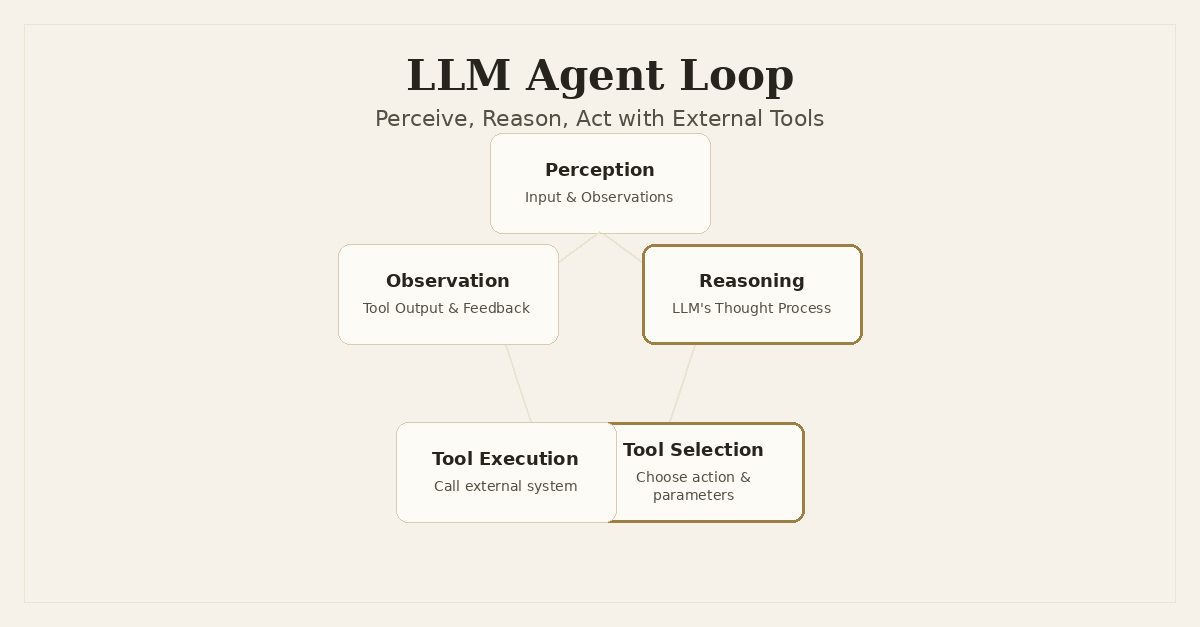
When I talk about LLM agents, I’m not just talking about a chatbot that can answer questions. I’m thinking about systems that can perceive their environment, reason about a problem, and then act on that reasoning by calling external tools. This is where the real power of large language models starts to move beyond content generation and into automation.
My work on projects like Dronzer AI Gateway, which handles robust multi-provider LLM routing, and Snapfix, which uses LLMs for real-time code fixes, has consistently pushed me towards thinking about how to make these models not just intelligent, but actionable. The leap from a simple API call to a production-ready agent capable of complex, multi-step tasks is significant. It involves architecting for reliability, managing state, and building resilient interfaces between the LLM and the rest of your system.
The Agent's Core: Perceive, Reason, Act
At its heart, an LLM agent operates on a loop: it takes in observations (Perceive), uses its LLM to decide what to do next (Reason), and then executes an action, often via an external tool (Act). This cycle repeats until a goal is achieved or a termination condition is met.
This isn't a new concept. Traditional AI has explored agent architectures for decades. What LLMs bring to the table is powerful natural language understanding and generation, allowing us to define tools and intentions in a much more flexible way. But this flexibility also introduces new challenges, especially when you need these systems to operate reliably in a production environment.
The Foundation: Robust LLM Orchestration
Before you even think about agentic loops, you need a solid foundation for your LLM calls. This is where something like Dronzer AI Gateway becomes critical. An agent's effectiveness is directly tied to the reliability and performance of its underlying LLM interactions. If the LLM call fails, or is slow, or returns garbage, your agent breaks down.
Dronzer AI Gateway abstracts away the complexities of interacting with multiple LLM providers. It handles:
- Provider Fallback: If OpenAI is down, it can route to Anthropic or Groq.
- Rate Limiting: Manages requests to stay within API limits.
- Cost Optimization: Routes to cheaper models for less complex tasks.
- API Compatibility: Provides a unified OpenAI-compatible interface.
This kind of robust orchestration isn't a luxury; it's a necessity for any production LLM system, especially agents that might make dozens of LLM calls in a single execution trace. You can't build a reliable agent on top of an unreliable LLM integration.
Defining Tools for LLMs: The Contract
The most critical component of an LLM agent is its ability to use external tools. These tools are essentially functions that the LLM can call to interact with the outside world: querying a database, sending an email, fetching live data, or in Snapfix's context, applying a code fix or running a linter.
The challenge is how to present these tools to the LLM in a way that it understands and can reliably invoke. Modern LLMs, especially those from OpenAI, Anthropic, and Google, support function calling or tool use features. This allows you to define tools using a structured schema, typically JSON Schema, and the LLM will respond with a structured call to one of those tools, including parameters.
I prefer using Pydantic for this in Python. It allows for clear, type-hinted definitions that can be easily converted to JSON Schema. This creates a strong contract between your code and the LLM.
Let's say we want an agent to be able to fetch real-time stock prices. We'd define a tool like this:
from pydantic import BaseModel, Field
from typing import Optional
import json

# 1. Define the tool's input schema using Pydantic
class GetStockPriceInput(BaseModel):
    symbol: str = Field(..., description="The stock ticker symbol (e.g., 'AAPL', 'GOOGL')")
    currency: Optional[str] = Field("USD", description="The currency to return the price in, defaults to USD.")

# 2. Define the tool itself (the actual function)
def get_stock_price(symbol: str, currency: str = "USD") -> float:
    """
    Fetches the current stock price for a given ticker symbol.
    """
    print(f"Executing get_stock_price for {symbol} in {currency}...")
    # In a real system, this would call an external API
    if symbol.upper() == "AAPL":
        return 170.50 # Example data
    elif symbol.upper() == "GOOGL":
        return 150.25 # Example data
    else:
        raise ValueError(f"Stock price for {symbol} not found.")

# 3. Represent the tool for the LLM (OpenAI function calling format)
def get_stock_price_tool_spec():
    return {
        "type": "function",
        "function": {
            "name": get_stock_price.__name__,
            "description": get_stock_price.__doc__.strip(),
            "parameters": GetStockPriceInput.model_json_schema()
        }
    }

# Example of how the LLM would see this (simplified)
# print(json.dumps(get_stock_price_tool_spec(), indent=2))
This structured approach is critical. Without it, the LLM might try to call get_stock_price(apple) instead of get_stock_price(symbol='AAPL'), leading to runtime errors. Pydantic ensures we're generating valid JSON Schema, which the LLM providers are trained on.
The Agent's Loop: Orchestrating Thought and Action
The core of an agent is its loop. A common pattern is ReAct (Reasoning and Acting), where the LLM interleaves internal 'thoughts' with external 'actions'.
Here’s a simplified conceptual loop. In a real system, this would be more complex, involving asynchronous calls, persistent state, and robust error handling.
import asyncio
from typing import List, Dict, Any, Callable
from openai import OpenAI # Or LiteLLM, or Dronzer AI Gateway client

# Assume this is our Dronzer AI Gateway client for simplicity
client = OpenAI(base_url="http://localhost:8000/v1", api_key="dummy")

def execute_tool(tool_name: str, args: Dict[str, Any], available_tools: Dict[str, Callable]) -> Any:
    """Executes a tool based on its name and arguments."""
    if tool_name in available_tools:
        tool_func = available_tools[tool_name]
        try:
            return tool_func(**args)
        except Exception as e:
            return f"Tool execution failed: {e}"
    else:
        return f"Error: Tool '{tool_name}' not found."

async def agent_loop(initial_query: str, tools_spec: List[Dict], available_tools_map: Dict[str, Callable], max_steps: int = 5):
    messages = [
        {"role": "system", "content": "You are a helpful assistant that can use tools to answer questions."},
        {"role": "user", "content": initial_query}
    ]

    for step in range(max_steps):
        print(f"\n--- Agent Step {step + 1} ---")
        print(f"Current Messages: {json.dumps(messages, indent=2)}")

        try:
            response = await client.chat.completions.create(
                model="gpt-4o", # Or whatever model Dronzer routes to
                messages=messages,
                tools=tools_spec,
                tool_choice="auto",
                temperature=0.0
            )
        except Exception as e:
            print(f"LLM call failed: {e}")
            messages.append({"role": "assistant", "content": f"Error: LLM call failed: {e}"})
            break # Exit loop on LLM error

        response_message = response.choices[0].message
        messages.append(response_message)

        if response_message.tool_calls:
            print("Agent decided to call a tool.")
            tool_outputs = []
            for tool_call in response_message.tool_calls:
                function_name = tool_call.function.name
                function_args = json.loads(tool_call.function.arguments)
                print(f"Calling tool: {function_name} with args: {function_args}")

                output = execute_tool(function_name, function_args, available_tools_map)
                tool_outputs.append(output)
                print(f"Tool output: {output}")

                messages.append({
                    "tool_call_id": tool_call.id,
                    "role": "tool",
                    "name": function_name,
                    "content": str(output) # LLM expects string content
                })
        elif response_message.content:
            print("Agent responded directly:")
            print(response_message.content)
            return response_message.content # Agent concluded
        else:
            print("Agent produced neither tool call nor direct response. Something is wrong.")
            break

    print("Max steps reached or agent finished.")
    return messages[-1].content if messages and messages[-1].content else "No final answer."

# --- Setup and Run ---
available_tools_map = {
    get_stock_price.__name__: get_stock_price
}
tools_spec = [get_stock_price_tool_spec()]

# Example usage
# asyncio.run(agent_loop("What is the current stock price of Apple (AAPL)?", tools_spec, available_tools_map))
# asyncio.run(agent_loop("Tell me a joke.", tools_spec, available_tools_map))
# asyncio.run(agent_loop("What is the price of a non-existent stock XYZ?", tools_spec, available_tools_map))
In this loop, the LLM's response_message dictates the next step: either it's a final answer (response_message.content), or it's a tool call (response_message.tool_calls). The execute_tool function then performs the actual work, and its output is fed back into the messages list as a tool role message, allowing the LLM to continue its reasoning with the new information.
State Management for Long-Running Agents
One of the biggest hurdles for production-ready agents is state management. A simple list of messages, as shown above, is fine for short, single-turn interactions. But what if an agent needs to work on a task over hours, or even days? What if it needs to remember context from previous sessions?
This is where persistent state management comes in. You can't just keep everything in memory. You need to store:
- Conversation History: The sequence of user prompts, LLM responses, tool calls, and tool outputs.
- Internal Monologue/Scratchpad: The LLM's 'thoughts' or intermediate reasoning steps, especially useful for debugging and audit trails.
- Tool State: Any relevant data generated or modified by tools that needs to persist across agent turns (e.g., a
session_idfor an external API, a file handle). - Agent Metadata: Current goal, remaining steps, last activity timestamp, etc.
For Snapfix, for instance, an agent might need to remember the entire codebase it's analyzing, the specific files it has modified, and the results of various linting or testing tools it has invoked. This context needs to be stored efficiently and retrieved as needed.
I typically use a PostgreSQL database for this, leveraging SQLAlchemy for ORM capabilities. Redis can also be a good choice for transient, high-speed state, but for long-term persistence and complex queries, a relational database is often more suitable.
Let's imagine a simple AgentRun model:
from sqlalchemy import create_engine, Column, Integer, String, Text, DateTime, JSON
from sqlalchemy.orm import sessionmaker, declarative_base
from datetime import datetime
from typing import List, Dict, Any
import json

Base = declarative_base()

class AgentRun(Base):
    __tablename__ = 'agent_runs'

    id = Column(Integer, primary_key=True, index=True)
    task_id = Column(String, index=True, nullable=False)
    current_step = Column(Integer, default=0)
    status = Column(String, default="running") # e.g., running, paused, completed, failed
    messages = Column(JSON, nullable=False, default=lambda: []) # Store full message history
    created_at = Column(DateTime, default=datetime.utcnow)
    updated_at = Column(DateTime, default=datetime.utcnow, onupdate=datetime.utcnow)

    def __repr__(self):
        return f"<AgentRun(id={self.id}, task_id='{self.task_id}', status='{self.status}')>"

# Example of how to manage agent state (simplified)
DATABASE_URL = "sqlite:///./agent_state.db"
engine = create_engine(DATABASE_URL)
Base.metadata.create_all(engine)
SessionLocal = sessionmaker(autocommit=False, autoflush=False, bind=engine)

# In a real application, you'd load/save state around each agent step
def get_agent_run(db_session, task_id: str) -> AgentRun:
    run = db_session.query(AgentRun).filter(AgentRun.task_id == task_id).first()
    if not run:
        run = AgentRun(task_id=task_id, messages=[])
        db_session.add(run)
        db_session.commit()
        db_session.refresh(run)
    return run

def update_agent_run_state(db_session, agent_run: AgentRun, new_message: Dict[str, Any], status: str = None):
    agent_run.messages.append(new_message)
    agent_run.current_step += 1
    if status:
        agent_run.status = status
    db_session.commit()
    db_session.refresh(agent_run)

# This would integrate into the agent_loop:
# with SessionLocal() as db:
#     agent_run = get_agent_run(db, "my_unique_task_id_123")
#     messages = agent_run.messages # Load existing messages
#     # ... run LLM and tools ...
#     update_agent_run_state(db, agent_run, new_llm_response_message)
#     update_agent_run_state(db, agent_run, new_tool_output_message)
The messages column, stored as JSON, holds the full history. This allows the agent to pick up exactly where it left off, even if the process restarts. Careful management of the messages list is also crucial to stay within the LLM's context window. Strategies like summarizing past turns or using vector stores for long-term memory become essential as the conversation grows.
Error Handling and Resilience
Production agents will fail. The question isn't if, but when, and how gracefully they recover. Common failure modes include:
- LLM Hallucinations: The LLM might invent a tool that doesn't exist, call a tool with incorrect parameters, or generate a nonsensical response.
- Tool Execution Failures: The external API might be down, the database query might fail, or the file operation might encounter permissions issues.
- Context Window Limits: The conversation history grows too large, leading to truncation or poor performance.
- Infinite Loops: The agent gets stuck in a cycle of reasoning and action without making progress towards its goal.
Building resilience involves:
- Input Validation: Ensure tool arguments generated by the LLM conform to expected types and values before execution. Pydantic helps here by raising validation errors.
- Robust Tool Execution: Wrap tool calls in
try...exceptblocks, implement retries with exponential backoff, and provide clear error messages back to the LLM as observations. - Bounded Loops: Implement
max_stepsormax_tokenslimits to prevent infinite loops and control costs. - Human-in-the-Loop: For critical or ambiguous situations, the agent should be able to escalate to a human operator, providing all its context and reasoning for review.
- LLM Instruction Tuning: Refine system prompts to encourage specific behaviors, like admitting when it doesn't know, asking clarifying questions, or indicating when a task is complete.
Consider this addition to our execute_tool function to return more structured errors to the LLM:
def execute_tool_robust(tool_name: str, args: Dict[str, Any], available_tools: Dict[str, Callable]) -> Dict[str, Any]:
    """Executes a tool, returning structured output including errors."""
    if tool_name not in available_tools:
        return {"status": "error", "message": f"Tool '{tool_name}' not found."}

    tool_func = available_tools[tool_name]
    try:
        # Validate arguments using the Pydantic model if available
        tool_input_schema = next((t['function']['parameters'] for t in tools_spec if t['function']['name'] == tool_name), None)
        if tool_input_schema:
            try:
                validated_args = GetStockPriceInput(**args).model_dump() # Assuming GetStockPriceInput is generic for all tools
            except Exception as e:
                return {"status": "error", "message": f"Invalid tool arguments: {e}", "details": args}
        else:
            validated_args = args

        result = tool_func(**validated_args)
        return {"status": "success", "output": result}
    except Exception as e:
        return {"status": "error", "message": str(e), "details": args}

# The agent loop would then parse this structured output and feed it back to the LLM.
# messages.append({
#     "tool_call_id": tool_call.id,
#     "role": "tool",
#     "name": function_name,
#     "content": json.dumps(output) # Send structured JSON back to LLM
# })
By returning structured JSON, the LLM can better parse the success or failure of a tool call and adjust its subsequent reasoning.
Evaluation and Monitoring
How do you know if your LLM agent is actually doing what it's supposed to? This is a tough problem. Traditional unit tests fall short because LLM outputs are non-deterministic. You need a robust evaluation framework.
Metrics for agents typically include:
- Success Rate: How often does the agent successfully complete its task?
- Latency: Time taken to complete a task (sum of LLM calls + tool executions).
- Cost: Total token usage and API costs per task.
- Correctness: Subjective evaluation of the final output or intermediate steps.
Observability is key. Log everything:
- LLM Prompts and Responses: The full
messageshistory for each turn. - Tool Calls and Outputs: What tools were called, with what arguments, and what was the exact output.
- Agent State Transitions: Changes in the agent's internal state or status.
This data allows you to replay agent runs, debug failures, and identify patterns where the LLM struggles. You can then use this to refine your prompts, improve tool definitions, or even retrain specific components.
Architectural Considerations
Deploying LLM agents in production requires careful architectural choices:
- Agent as a Service: Package your agent logic into a dedicated service (e.g., a FastAPI application). This allows for horizontal scaling, separation of concerns, and independent deployment. Each agent instance could manage one or more concurrent
AgentRuns. - Asynchronous Processing: Agent steps involve I/O-bound operations (LLM API calls, external tool calls). Use
asyncioin Python to handle multiple concurrent agents efficiently without blocking. My experience withFastAPIandasyncpgfor theDronzer AI Gatewayhas shown how crucial proper async handling is for high-performance I/O. - Queueing Systems: For long-running or batch tasks, integrate with message queues (e.g., RabbitMQ, Kafka). An agent could publish a message when it needs to perform a long-running tool execution and then consume a response message when the tool completes, resuming its reasoning.
- Stateless Agent Orchestrators: Design the core agent loop to be as stateless as possible, relying on the persistent
AgentRunstate in the database. This makes it easier to scale horizontally and recover from failures.
Conclusion
Building production-ready LLM agents is a complex but rewarding engineering challenge. It forces you to think deeply about system design, fault tolerance, and the nuances of integrating non-deterministic models into deterministic software workflows.
It's a journey from simple API calls to sophisticated, autonomous systems. The key is to embrace structured definitions for tools, design robust agent loops, meticulously manage state, and build comprehensive error handling and observability into every layer. My work on Dronzer AI Gateway provides the bedrock for reliable LLM interactions, allowing me to focus on the higher-level orchestration required for truly intelligent and actionable agents. There's still a lot to learn, but the path forward is clear: build with resilience and observability at the forefront.
Frequently Asked Questions
What is an LLM agent in a production context?
In production, an LLM agent is a system that uses a large language model to reason, plan, and execute actions by interacting with external tools and managing its own operational state, going beyond simple single-turn responses.
Why is structured tool definition crucial for LLM agents?
Structured tool definitions, often using schemas like Pydantic, provide the LLM with a clear, unambiguous contract for how to call external functions. This minimizes hallucinations, improves reliability, and enables robust parsing of the LLM's chosen actions.
How do you manage state for long-running LLM agents?
Managing state for long-running agents involves persisting the agent's internal monologue, tool observations, and decisions across turns. This often requires storing structured data in a database or key-value store, along with strategies to prune context to fit within LLM token limits.
What are common challenges when building production LLM agents?
Key challenges include ensuring reliable tool execution, handling LLM hallucinations in tool calls, managing and persisting agent state, designing effective evaluation metrics, and building robust error recovery mechanisms for both LLM and tool failures.
Written by Ansh Gautam
Full-stack engineer building production systems with FastAPI, React, and AI/LLM integrations. Currently looking for backend engineering & AI integration roles.