Trust, But Verify: Enhancing Real-Time GPS Attendance with Velocity Filters
I ran into an issue with our real-time attendance system where unreliable client-side GPS data led to false attendance records. The fix involved implementing server-side velocity checks to flag impossible student movements.
Trust, But Verify: Enhancing Real-Time GPS Attendance with Velocity Filters
Building a real-time system that relies on client-side data always comes with a caveat: you can't trust everything the client tells you. I learned this firsthand with the attendance management system I built. It uses FastAPI, WebSockets, and Leaflet.js to provide GPS-verified attendance for hundreds of concurrent users, aiming for sub-50ms sync times. The system was robust for basic location checks, using polygon geofencing to confirm if a student was within the designated campus area. But then, the data started telling a different story.
The Problem: Students Teleporting Across Campus
Initially, the attendance system worked as expected. Students connected via WebSockets, reported their GPS coordinates, and the backend would verify if they were within the allowed geofence. If they were, they'd be marked present. Simple. Efficient. Until it wasn't.
We started noticing anomalies in the attendance logs. Students were being marked present at location A, then five seconds later, at location B, which was kilometers away. According to the system, these students were achieving speeds that defied physics, effectively teleporting across campus or even across town. This wasn't a one-off glitch; it was happening with enough frequency to raise serious questions about the integrity of our attendance records.
The immediate impact was a loss of trust in the automated system. Administrators had to manually review flagged instances, cross-reference with other data, and often override the system's decisions. This defeated the entire purpose of an automated system designed to cut administrative workload by 80%. The problem wasn't that students were outside the geofence; it was how they were moving between points, or rather, the impossible speeds implied by their reported locations.
Traditional geofencing, while crucial, only answers the question: "Are you currently in the right place?" It doesn't, however, answer: "Did you arrive at this place legitimately, or did you just jump here instantaneously?" We needed a way to validate the consistency of movement between reported GPS points.
Root Cause Analysis: Over-Reliance on Client-Side Data & Lack of Context
The core of the problem stemmed from two main issues:
-
Blind Trust in Client Data: Our system, like many, was designed to accept GPS coordinates and timestamps as reported by the client application. While client-side security measures were in place, sophisticated users can bypass these. GPS spoofing applications are readily available, allowing users to feed fabricated location data to their devices. Network delays could also cause a burst of old location data to arrive at once, creating an artificial 'jump' in reported position, though usually not as extreme.
-
Lack of Server-Side Contextual Validation: The FastAPI backend processed each incoming WebSocket message as an independent event. It would take the latest coordinates, check them against the geofence, and update the attendance status. What it didn't do was compare the current reported location against the immediately preceding reported location for that specific user. There was no historical context maintained server-side to detect impossible transitions.
The inherent unreliability and potential for manipulation of raw GPS data, especially from mobile devices (which can suffer from signal drift, multi-path errors, and varying accuracy), meant that a simple geofence check was insufficient for a system requiring high integrity.
We needed to introduce a server-side mechanism that could intelligently assess the plausibility of a reported location update based on the user's recent movement history. This meant not just knowing where a student was, but also how fast they got there from their last known position.
The Solution: Real-Time Server-Side Velocity Anomaly Detection
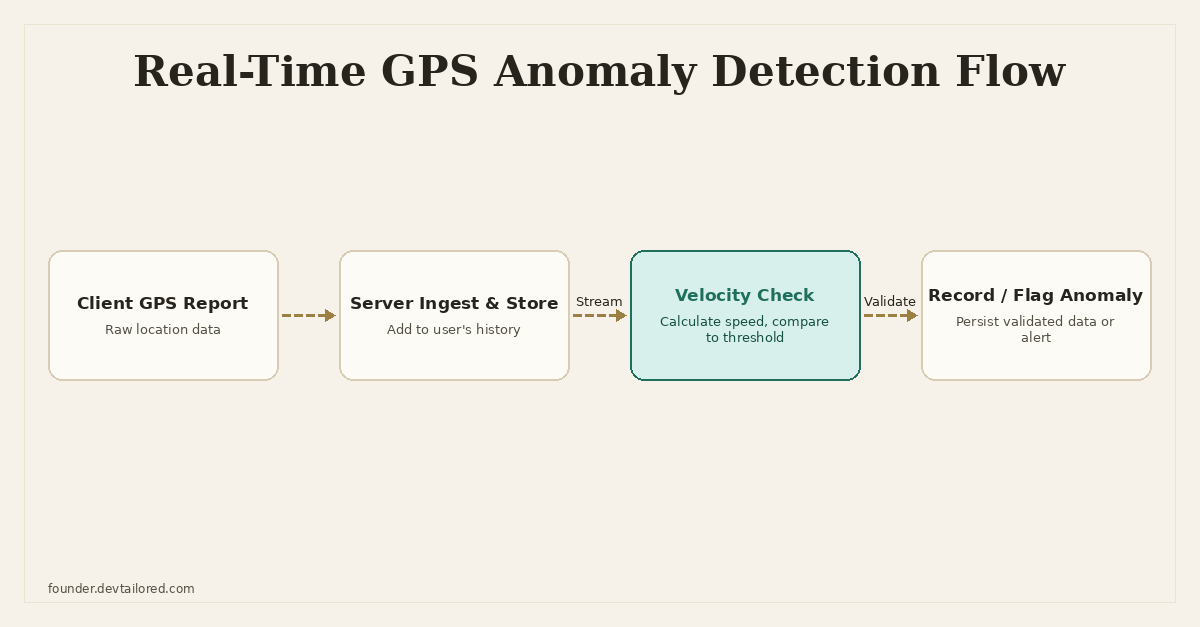
The solution I implemented was a server-side velocity anomaly detection system. The core principle is simple: for every incoming GPS update from a user, we retrieve their last known valid location and timestamp. We then calculate the distance between these two points and the time elapsed. If the implied speed exceeds a predefined, realistic threshold, the new location is flagged as anomalous and potentially invalid.
Data Storage for Real-Time History
Storing the last known location for hundreds of concurrent users, and retrieving it on every WebSocket message, demands a fast, low-latency data store. I considered a few options:
-
Relational Database (e.g., PostgreSQL with SQLAlchemy): While persistent and robust, querying a database on every single real-time location update for 300+ users would introduce significant latency.
asyncpgandasynciocould help, but the overhead of database transactions for ephemeral state is generally too high for this use case. -
In-Memory Python Dictionary: Extremely fast, but not suitable for production. It wouldn't persist across application restarts or multiple worker processes (if using Gunicorn with multiple workers, each worker would have its own isolated state, leading to inconsistent data).
-
Redis: This was the ideal choice. Redis is an in-memory data store that offers extremely low-latency reads and writes. It supports persistence, can be shared across multiple worker processes, and provides a simple key-value interface perfect for storing
user_id -> last_location_datamappings. ItsEXPIREcommand also allows for automatic cleanup of stale data, which is useful if a student disconnects for a long time.
I decided to use Redis to store the last valid GPS coordinate and its timestamp for each active user. This ephemeral state would be updated with every valid incoming message.
Geospatial Calculations: The Haversine Formula
To calculate the distance between two GPS coordinates (latitude and longitude), we can't just use Euclidean distance. The Earth is a sphere (or oblate spheroid), so we need a formula that accounts for its curvature. The Haversine formula is perfect for this, providing the great-circle distance between two points on a sphere given their longitudes and latitudes. It's accurate enough for our purposes and computationally efficient.
Here's the Python implementation I used:
import math
from typing import Tuple

def haversine_distance(lat1: float, lon1: float, lat2: float, lon2: float) -> float:
    """
    Calculate the distance between two points on Earth using the Haversine formula.
    Returns distance in kilometers.
    """
    R = 6371.0  # Earth radius in kilometers

    lat1_rad = math.radians(lat1)
    lon1_rad = math.radians(lon1)
    lat2_rad = math.radians(lat2)
    lon2_rad = math.radians(lon2)

    dlon = lon2_rad - lon1_rad
    dlat = lat2_rad - lat1_rad

    a = math.sin(dlat / 2)**2 + math.cos(lat1_rad) * math.cos(lat2_rad) * math.sin(dlon / 2)**2
    c = 2 * math.atan2(math.sqrt(a), math.sqrt(1 - a))

    distance = R * c
    return distance


def calculate_speed(distance_km: float, time_delta_seconds: float) -> float:
    """
    Calculate speed in kilometers per hour (km/h).
    """
    if time_delta_seconds <= 0:
        return float('inf') # Avoid division by zero or negative time

    # Convert seconds to hours
    time_delta_hours = time_delta_seconds / 3600
    return distance_km / time_delta_hours

# Example usage:
# lat_prev, lon_prev = 34.0522, -118.2437 # Los Angeles
# lat_curr, lon_curr = 34.0522, -118.2437 # Los Angeles
# dist = haversine_distance(lat_prev, lon_prev, lat_curr, lon_curr)
# print(f"Distance: {dist} km")
Setting Realistic Thresholds
Defining what constitutes an "impossible" speed is crucial. This threshold needs to be tuned based on the context of the system. For a student attendance system on a campus, realistic maximum speeds are quite low.
- Max walking speed: ~5-6 km/h
- Max running speed: ~20-25 km/h (for short bursts)
- Max cycling speed: ~30-40 km/h
- Max vehicle speed (on campus roads): ~50 km/h
I chose a threshold of 80 km/h (approx. 50 mph). This is significantly higher than any legitimate movement on a campus, accounting for slight GPS inaccuracies or short-distance vehicle travel if a student is, for example, dropped off by a car. Any speed exceeding this is highly suspicious. It's a balance: too strict, and you get false positives from GPS jitter; too lenient, and you miss spoofing attempts.
Integration with FastAPI WebSockets
The velocity check needed to be seamlessly integrated into the existing WebSocket message processing flow. Each incoming message contains a latitude, longitude, and timestamp.
Here's how I structured the integration:
- Incoming Message: A student sends a WebSocket message with their current GPS coordinates and a client-side timestamp.
- Retrieve Last Location: The backend immediately queries Redis using the
user_idto get thelast_known_locationandlast_known_timestamp. - Perform Velocity Check: If a
last_known_locationexists, calculate the distance and time delta. Compute the speed. If it exceeds the threshold, flag the message. - Update Redis: If the current location is deemed valid (either no previous data, or within speed limits), update Redis with the current location and timestamp. This ensures that only validated points are used for subsequent checks.
- Persist & Act: If valid, persist the attendance record to the main PostgreSQL database. If flagged, log the anomaly, potentially notify an administrator, and optionally reject the attendance update.
import json
import redis.asyncio as aioredis
from fastapi import FastAPI, WebSocket, WebSocketDisconnect
from datetime import datetime, timezone
from typing import Dict, Any
import asyncio

# Assuming haversine_distance and calculate_speed functions are defined as above
# (omitted for brevity in this block, but would be imported/defined)

app = FastAPI()

# Redis client setup
# In a real app, this would be managed via dependency injection or a global connection pool
redis_client: aioredis.Redis = None

@app.on_event("startup")
async def startup_event():
    global redis_client
    redis_client = aioredis.from_url("redis://localhost:6379/0", encoding="utf-8", decode_responses=True)
    print("Connected to Redis")

@app.on_event("shutdown")
async def shutdown_event():
    if redis_client:
        await redis_client.close()
        print("Disconnected from Redis")

# Max allowed speed in km/h
MAX_ALLOWED_SPEED_KMH = 80.0

class ConnectionManager:
    def __init__(self):
        self.active_connections: Dict[str, WebSocket] = {}

    async def connect(self, websocket: WebSocket, user_id: str):
        await websocket.accept()
        self.active_connections[user_id] = websocket

    def disconnect(self, user_id: str):
        del self.active_connections[user_id]

    async def send_personal_message(self, message: str, user_id: str):
        if user_id in self.active_connections:
            await self.active_connections[user_id].send_text(message)

manager = ConnectionManager()

async def process_location_update(
    user_id: str,
    current_lat: float,
    current_lon: float,
    client_timestamp_str: str,
    db_session # Placeholder for SQLAlchemy session
):
    # Convert client timestamp string to datetime object (assuming ISO format)
    client_timestamp = datetime.fromisoformat(client_timestamp_str).replace(tzinfo=timezone.utc)
    current_server_time = datetime.now(timezone.utc)

    # Get last known location from Redis
    last_location_key = f"user:{user_id}:last_location"
    last_location_data_str = await redis_client.get(last_location_key)

    is_anomaly = False
    if last_location_data_str:
        last_location_data = json.loads(last_location_data_str)
        last_lat = last_location_data["lat"]
        last_lon = last_location_data["lon"]
        last_timestamp_str = last_location_data["timestamp"]
        last_timestamp = datetime.fromisoformat(last_timestamp_str).replace(tzinfo=timezone.utc)

        distance_km = haversine_distance(last_lat, last_lon, current_lat, current_lon)
        time_delta_seconds = (client_timestamp - last_timestamp).total_seconds()

        if time_delta_seconds > 0:
            speed_kmh = calculate_speed(distance_km, time_delta_seconds)
            print(f"User {user_id}: Distance={distance_km:.2f}km, Time={time_delta_seconds:.2f}s, Speed={speed_kmh:.2f} km/h")
            if speed_kmh > MAX_ALLOWED_SPEED_KMH:
                is_anomaly = True
                print(f"ANOMALY DETECTED for user {user_id}: Speed {speed_kmh:.2f} km/h exceeded {MAX_ALLOWED_SPEED_KMH} km/h")
        else:
            # Time delta is zero or negative, could indicate replayed data or same point
            # For simplicity, we'll treat same point as valid, negative time as anomaly
            if time_delta_seconds < 0:
                is_anomaly = True # Client timestamp is older than last recorded, suspicious
                print(f"ANOMALY DETECTED for user {user_id}: Client timestamp older than last recorded.")

    if not is_anomaly:
        # Store current valid location and timestamp in Redis
        current_location_data = {
            "lat": current_lat,
            "lon": current_lon,
            "timestamp": client_timestamp.isoformat()
        }
        await redis_client.set(last_location_key, json.dumps(current_location_data))
        # Optionally set an expiry for the key if user goes offline for long
        await redis_client.expire(last_location_key, 3600 * 24) # e.g., 24 hours

        # --- Here, you would save the attendance record to your main database (e.g., PostgreSQL) ---
        # Example: await db_session.add(AttendanceRecord(user_id=user_id, lat=current_lat, lon=current_lon, timestamp=client_timestamp, status='present'))
        # await db_session.commit()
        print(f"User {user_id} attendance recorded successfully at ({current_lat}, {current_lon}).")
        return {"status": "success", "message": "Attendance recorded."}
    else:
        # --- Log anomaly to database or send alert ---
        # Example: await db_session.add(AnomalyLog(user_id=user_id, type='speed_anomaly', ...))
        # await db_session.commit()
        print(f"User {user_id} attendance request rejected due to anomaly.")
        return {"status": "rejected", "message": "Location update rejected due to anomaly."}


@app.websocket("/ws/{user_id}")
async def websocket_endpoint(websocket: WebSocket, user_id: str):
    await manager.connect(websocket, user_id)
    try:
        while True:
            data = await websocket.receive_text()
            payload = json.loads(data)
            lat = payload.get("latitude")
            lon = payload.get("longitude")
            client_timestamp = payload.get("timestamp") # ISO 8601 string

            if lat is None or lon is None or client_timestamp is None:
                await manager.send_personal_message("Invalid location data format.", user_id)
                continue

            # In a real application, you'd get a DB session here
            # async with get_db_session() as db_session:
            response = await process_location_update(user_id, lat, lon, client_timestamp, db_session=None) # Pass None for example
            await manager.send_personal_message(json.dumps(response), user_id)

    except WebSocketDisconnect:
        manager.disconnect(user_id)
        print(f"User {user_id} disconnected")
    except Exception as e:
        print(f"Error for user {user_id}: {e}")
        # Consider detailed error logging
        manager.disconnect(user_id)
This process_location_update function is the core of the new validation logic. It's called for every incoming location update and decides whether to accept or reject the data based on velocity. The db_session placeholder indicates where actual database persistence would occur, typically managed by FastAPI's dependency injection for SQLAlchemy sessions.
Edge Cases and Refinements
Implementing this system brought up several considerations for edge cases:
-
Initial Connection: When a user first connects or reports their location, there's no previous data to compare against. The first report must always be accepted (after geofencing, of course). The
last_location_data_strcheck handles this by only performing velocity checks if previous data exists. -
Long Gaps Between Reports: If a user's last reported location was hours ago, calculating speed against it might be misleading. For instance, a student might legitimately travel off-campus and return. The Redis
expirecommand helps here; if a user is inactive for too long, theirlast_locationkey expires, effectively resetting their state for velocity checks. Alternatively, a maximumtime_delta_secondscould be enforced, after which the velocity check is skipped. -
GPS Accuracy Variations: GPS signals aren't perfectly precise. A device might report slight jitters even when stationary. Setting the
MAX_ALLOWED_SPEED_KMHwith a generous buffer (like 80 km/h for a campus scenario) helps mitigate false positives from minor GPS drift. For more critical applications, one might consider using Kalman filters or other smoothing algorithms on the client or server side, but for attendance, a simple threshold was sufficient. -
Client-Side Timestamp vs. Server-Side Receipt Time: It's important to use the client's reported timestamp for velocity calculations, as this reflects the actual time the measurement was taken. However, a server-side check on the freshness of the client timestamp (e.g., if
current_server_time - client_timestampis excessively large) can detect delayed or replayed data, which could also be a form of spoofing. -
Multiple Devices/Sessions: If a user has multiple devices reporting attendance, the
user_idkey in Redis would need to be disambiguated (e.g.,user:{user_id}:device:{device_id}:last_location) to track each device's movement independently. For our system, one device per user was the norm, simplifying the key structure. -
Alerting Mechanisms: When an anomaly is detected, it's not enough to just reject the data. We need to log these events, potentially send real-time alerts to administrators, or even temporarily suspend attendance reporting for the suspicious user. This helps in proactive monitoring and investigation.
Performance Considerations
Introducing real-time velocity checks on every WebSocket message could potentially impact performance. Here's how I managed it:
-
Redis's Speed: Redis is purpose-built for high-speed key-value operations. A
GETandSEToperation on a string key typically takes microseconds. Even with hundreds of concurrent users, Redis handles this load with ease, making it a non-bottleneck. -
CPU Cost of Haversine: The Haversine formula involves a handful of trigonometric functions and arithmetic operations. These are very fast. Python's
mathmodule is implemented in C, so these operations are highly optimized. The cumulative CPU cost for hundreds of calls per second is negligible on a modern CPU. -
Asynchronous Processing: FastAPI and
aioredisare built onasyncio. This means that I/O operations (like Redis calls) are non-blocking. The Python event loop can efficiently switch between tasks while waiting for Redis, ensuring that the system remains responsive even under high concurrency. Theprocess_location_updatefunction isasync, allowing it to yield control during Redis I/O.
Overall, the performance impact was minimal, maintaining the sub-50ms sync requirement for attendance updates while adding a crucial layer of data integrity.
Lessons Learned
This experience reinforced several fundamental engineering principles:
-
Never Blindly Trust Client Data: This is a golden rule in security and data integrity. Always validate, sanitize, and verify client-provided information on the server side. Even seemingly innocuous data like GPS coordinates can be manipulated.
-
Contextual Validation Adds Significant Value: While individual data points might seem valid in isolation, their context (e.g., sequence, timing, relationship to other data) can reveal anomalies. Building systems that understand and leverage this context leads to more robust and reliable applications.
-
Choose the Right Tool for the Right Job: Using Redis for ephemeral, fast-access state was critical. Trying to achieve the same performance with a traditional relational database would have been an uphill battle, potentially requiring complex caching layers or significantly more hardware.
-
Balance Strictness with User Experience: Setting validation thresholds requires careful tuning. Too strict, and legitimate users might get flagged due to minor GPS inaccuracies. Too lenient, and the validation becomes ineffective. It's an iterative process of monitoring, feedback, and adjustment.
-
Iterative Refinement of Validation Rules: As systems evolve and new attack vectors or data quirks emerge, validation rules need to be updated. This velocity check was a significant improvement, but it doesn't solve every potential spoofing method (e.g., walking slowly with a spoofed GPS). It's a continuous battle.
Conclusion
The implementation of server-side GPS velocity anomaly detection significantly improved the data integrity of our real-time attendance system. By moving beyond simple geofencing and adding a layer of movement coherence validation, we effectively stopped the 'teleporting students' problem. This restored trust in the automated attendance process, reduced administrative overhead, and made the system far more resilient against intentional manipulation and unintentional GPS errors. It's a testament to the idea that in real-time systems, a little bit of server-side skepticism goes a long way.
Frequently Asked Questions
What problem did unreliable client-side GPS data cause in the attendance system?
It led to situations where students could appear to 'teleport' between locations or report attendance from invalid places, compromising the integrity of the attendance records and requiring manual overrides.
How does server-side velocity checking work to detect anomalies?
The server stores a short history of reported GPS coordinates for each user. When a new coordinate arrives, it calculates the implied speed from the previous point using the Haversine formula. If this speed exceeds a realistic threshold, the location is flagged as anomalous.
Why is server-side GPS validation preferred over client-side checks?
Client-side validation is inherently susceptible to bypass or manipulation by users. Server-side checks provide a robust, authoritative layer of verification that cannot be easily circumvented, ensuring higher data integrity.
What are the performance considerations for implementing real-time velocity checks?
To minimize latency, efficient data structures like Redis are used for temporary historical location storage. Optimized geospatial calculations (Haversine) and FastAPI's asynchronous capabilities ensure these checks run effectively even with hundreds of concurrent connections without becoming a bottleneck.
Written by Ansh Gautam
Full-stack engineer building production systems with FastAPI, React, and AI/LLM integrations. Currently looking for backend engineering & AI integration roles.