Pinpointing Presence: Moving to Polygon Geofencing for Accurate Attendance
I detail how I tackled imprecise GPS attendance verification in a real-time system by moving from simple radius checks to robust polygon-based geofencing with PostGIS and FastAPI.
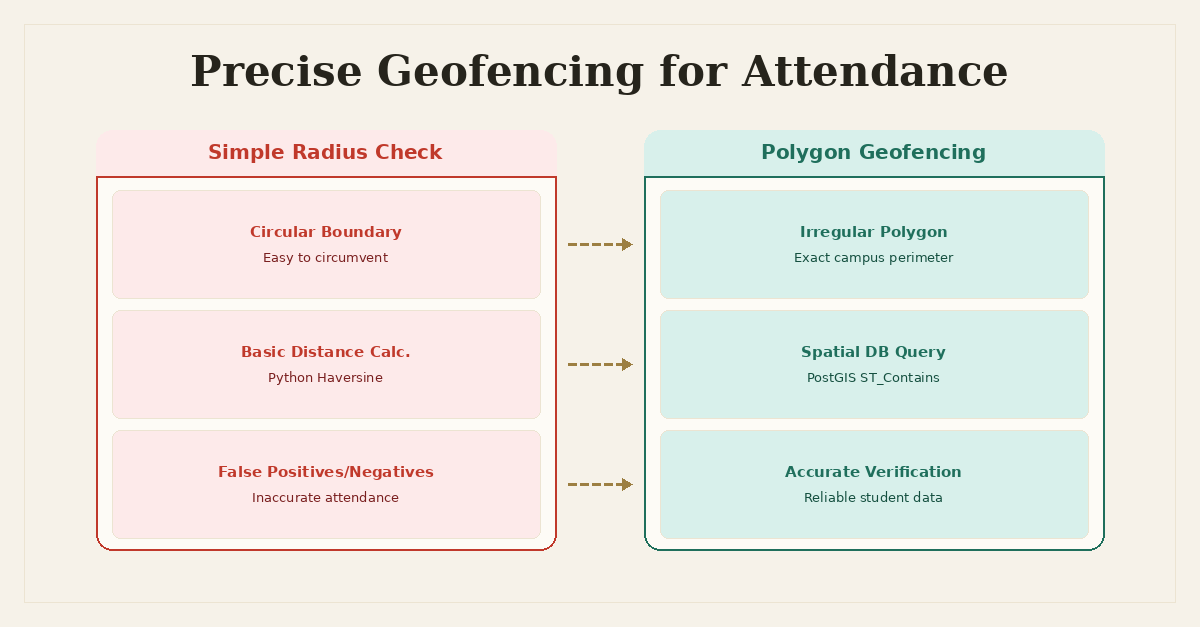
Pinpointing Presence: Moving to Polygon Geofencing for Accurate Attendance
I built a real-time attendance management system that served hundreds of concurrent users, primarily students marking their presence via a WebSocket connection. The system was designed to be GPS-verified, meaning a student's reported location had to fall within predefined campus boundaries. Initially, this seemed straightforward: grab the student's latitude and longitude, then check if it was within a certain radius of the school's central coordinates. Simple enough, right?
It wasn't. The system started generating complaints and requiring constant manual adjustments. Students were marking attendance from places clearly outside the campus, like the coffee shop across the street or even their dorm room a block away, while others genuinely on campus sometimes found their attendance rejected. The 'GPS-verified' part of the system was failing its primary purpose: accuracy.
The Problem: When Simple Geofencing Fails
The initial implementation of our attendance verification was based on a fundamental misconception of real-world geography. We defined each campus with a single (latitude, longitude) pair representing its approximate center and a radius_meters value. When a student submitted their attendance through the WebSocket, the server would receive their current coordinates and perform a ST_Distance check (or a Python Haversine distance calculation) against this central point.
Here’s a simplified version of what that looked like conceptually:
from math import radians, sin, cos, sqrt, atan2

def haversine_distance(lat1, lon1, lat2, lon2):
    R = 6371000  # Radius of Earth in meters

    lat1, lon1, lat2, lon2 = map(radians, [lat1, lon1, lat2, lon2])

    dlon = lon2 - lon1
    dlat = lat2 - lat1

    a = sin(dlat / 2)**2 + cos(lat1) * cos(lat2) * sin(dlon / 2)**2
    c = 2 * atan2(sqrt(a), sqrt(1 - a))

    distance = R * c
    return distance

# ... inside a FastAPI endpoint or WebSocket handler ...
async def verify_attendance_simple(student_lat: float, student_lon: float, campus_id: int):
    # Imagine fetching campus_center_lat, campus_center_lon, campus_radius from DB
    campus_center_lat = 34.0522
    campus_center_lon = -118.2437
    campus_radius = 500 # 500 meters

    distance = haversine_distance(
        student_lat, student_lon,
        campus_center_lat, campus_center_lon
    )

    if distance <= campus_radius:
        return True # Within campus
    else:
        return False # Outside campus
This approach had several critical flaws:
- Irregular Campus Shapes: Most university campuses or school grounds are not perfect circles. They have irregular boundaries, buildings that extend in specific directions, and often incorporate multiple distinct areas. A single radius check inevitably meant that large, valid portions of the campus were outside the circle, while invalid areas (like public roads, neighboring businesses, or even apartment complexes) fell within the circle.
- Exploitable Loopholes: Students quickly learned the boundaries of the invisible circle. They could stand just outside the 'official' campus perimeter but still within the allowed radius and mark attendance. This undermined the integrity of the entire system.
- False Negatives: Conversely, students genuinely within a valid part of the campus, but perhaps in an awkwardly shaped wing or annex that extended beyond the circular boundary, found their attendance rejected. This led to frustration and increased support tickets.
- Maintenance Overhead: When campus layouts changed slightly, or new buildings were added, adjusting a single radius was rarely sufficient. We'd have to tweak the
campus_centerandradiusparameters, which was more guesswork than precision engineering.
The system was functional, but it wasn't accurate. And for attendance, accuracy is paramount. We needed a solution that respected the actual, complex geometry of the campus.
Root Cause Analysis: The Limits of Euclidean Geometry for Real-World Spaces
The root cause was a mismatch between our simplified geometric model (a circle) and the complex reality of physical space (an irregular polygon). Our initial design assumed that the 'campus' could be adequately represented by a single point and a distance. This is fine for rough proximity checks, but not for definitive, boundary-respecting verification.
When dealing with geographic data, especially for precise boundary checks, simple Euclidean distance or even Haversine distance to a point isn't enough. We needed a "point in polygon" test. This means defining the exact perimeter of the campus as a polygon (or a set of polygons, for disjoint areas) and then checking if the student's reported GPS coordinate falls inside any of those polygons.
Performing such a check for every single attendance request, potentially hundreds per second during peak times, demanded an efficient solution. Naive Python implementations of point-in-polygon algorithms can be computationally intensive if polygons are complex or numerous. Loading all campus polygons into memory and iterating through them for every request would quickly become a bottleneck, negating the benefits of FastAPI's async capabilities.
This pointed directly to the database. PostgreSQL, specifically with its PostGIS extension, is purpose-built for handling spatial data efficiently. It allows you to store geographic objects (points, lines, polygons) directly, index them spatially, and perform complex geometric operations at the database level. Our SQLAlchemy ORM would need to interface with this.
The Solution: PostGIS and Polygon Geofencing in FastAPI
The solution involved a significant shift in how we stored and processed location data. We moved from simple latitude/longitude/radius columns to storing actual geometric shapes (polygons) and leveraging PostGIS for spatial queries.
1. Database Schema Redesign with PostGIS
First, I enabled the PostGIS extension on our PostgreSQL database. Then, I updated the Campus model to store its boundary as a Geometry type. I chose MultiPolygon to handle cases where a campus might have non-contiguous areas (e.g., buildings separated by a public road).
-- Enable PostGIS extension if not already done
CREATE EXTENSION postgis;

-- Modify the existing campuses table or create a new one
ALTER TABLE campuses
ADD COLUMN boundary GEOMETRY(MultiPolygon, 4326); -- SRID 4326 for WGS 84 (GPS coordinates)

-- Add a spatial index for performance
CREATE INDEX idx_campuses_boundary ON campuses USING GIST (boundary);
Explanation:
GEOMETRY(MultiPolygon, 4326): This specifies a PostGISGEOMETRYcolumn that will storeMultiPolygonobjects.4326is the Spatial Reference System Identifier (SRID) for WGS 84, which is the standard coordinate system used by GPS devices. It's crucial to always specify the SRID when working with spatial data.GIST (boundary): A Generalized Search Tree (GiST) index is a type of spatial index that significantly speeds up spatial queries (like intersection or containment checks) on geometric columns. Without it, the database would have to perform full table scans for every spatial query, which is a non-starter for high-concurrency systems.
2. SQLAlchemy Integration with GeoAlchemy2
To interact with PostGIS from Python, GeoAlchemy2 is the go-to library. It provides SQLAlchemy types and functions that map directly to PostGIS spatial types and operations.
First, install it:
pip install geoalchemy2
Then, update the SQLAlchemy model:
from sqlalchemy import Column, Integer, String
from sqlalchemy.ext.declarative import declarative_base
from geoalchemy2 import Geometry

Base = declarative_base()

class Campus(Base):
    __tablename__ = "campuses"

    id = Column(Integer, primary_key=True)
    name = Column(String, nullable=False)
    # The PostGIS Geometry column for the campus boundary
    boundary = Column(Geometry(geometry_type='MultiPolygon', srid=4326), nullable=False)

    def __repr__(self):
        return f"<Campus(id={self.id}, name='{self.name}')>"
Populating this boundary column involves converting GeoJSON or WKT (Well-Known Text) representations of polygons into PostGIS Geometry objects. For example, to insert a simple square campus:
from sqlalchemy import create_engine
from sqlalchemy.orm import sessionmaker
from geoalchemy2.shape import from_shape
from shapely.geometry import Polygon

# ... (define Campus model as above) ...

engine = create_engine("postgresql://user:password@host:port/database")
Base.metadata.create_all(engine)
SessionLocal = sessionmaker(autocommit=False, autoflush=False, bind=engine)

def get_db():
    db = SessionLocal()
    try:
        yield db
    finally:
        db.close()

# Example polygon for a campus (simplified square)
# Coordinates are (longitude, latitude) for GeoJSON/Shapely
campus_polygon = Polygon([
    (-118.245, 34.050),
    (-118.240, 34.050),
    (-118.240, 34.055),
    (-118.245, 34.055),
    (-118.245, 34.050) # Close the polygon
])

# Convert shapely polygon to GeoAlchemy2 Geometry object
geo_boundary = from_shape(campus_polygon, srid=4326)

db = next(get_db())
new_campus = Campus(name="Main Campus", boundary=geo_boundary)
db.add(new_campus)
db.commit()
db.refresh(new_campus)
print(f"Added campus: {new_campus}")
db.close()
3. Real-Time Geofencing Logic in FastAPI
Now, the core verification logic in our FastAPI WebSocket handler or API endpoint could leverage PostGIS's spatial functions. The most relevant function here is ST_Contains (or ST_Within). ST_Contains(A, B) returns true if geometry A completely contains geometry B.
from fastapi import FastAPI, WebSocket, Depends, HTTPException, status
from sqlalchemy.orm import Session
from geoalchemy2.functions import ST_Contains, ST_SetSRID, ST_MakePoint
from geoalchemy2.shape import to_shape # Useful for debugging/visualization

# ... (Campus model and get_db() function from above) ...

app = FastAPI()

@app.websocket("/ws/attendance")
async def websocket_endpoint(websocket: WebSocket, db: Session = Depends(get_db)):
    await websocket.accept()
    try:
        while True:
            data = await websocket.receive_json()
            student_lat = data.get("latitude")
            student_lon = data.get("longitude")
            campus_id = data.get("campus_id") # Or derive from user session

            if not all([student_lat, student_lon, campus_id]):
                await websocket.send_json({"status": "error", "message": "Missing location data or campus ID"})
                continue

            # Create a PostGIS Point object from student's coordinates
            # ST_MakePoint takes (longitude, latitude)
            student_point = ST_SetSRID(ST_MakePoint(student_lon, student_lat), 4326)

            # Query the database to find if the student's point is within any campus boundary
            # Using ST_Contains(campus.boundary, student_point)
            is_within_campus = db.query(Campus.id)
                               .filter(Campus.id == campus_id)
                               .filter(ST_Contains(Campus.boundary, student_point))
                               .first()

            if is_within_campus:
                # Record attendance, send confirmation
                print(f"Student at ({student_lat}, {student_lon}) is within Campus ID {campus_id}")
                await websocket.send_json({"status": "success", "message": "Attendance recorded"})
            else:
                # Reject attendance, send error
                print(f"Student at ({student_lat}, {student_lon}) is OUTSIDE Campus ID {campus_id}")
                await websocket.send_json({"status": "error", "message": "You are outside the campus boundary."})

    except Exception as e:
        print(f"WebSocket error: {e}")
    finally:
        await websocket.close()


@app.get("/verify_location/{campus_id}")
async def verify_location_http(
    campus_id: int,
    latitude: float,
    longitude: float,
    db: Session = Depends(get_db)
):
    student_point = ST_SetSRID(ST_MakePoint(longitude, latitude), 4326)

    is_within_campus = db.query(Campus.id)
                       .filter(Campus.id == campus_id)
                       .filter(ST_Contains(Campus.boundary, student_point))
                       .first()

    if is_within_campus:
        return {"status": "success", "message": f"Within Campus ID {campus_id}"}
    else:
        raise HTTPException(status_code=status.HTTP_403_FORBIDDEN, detail="Outside campus boundary.")
Key aspects of this solution:
ST_MakePoint(longitude, latitude): PostGIS functions typically expect coordinates in(longitude, latitude)order, which is standard for GeoJSON and often for spatial databases. It's a common pitfall to mix this up with(latitude, longitude)often used in client-side GPS APIs.ST_SetSRIDthen assigns the correct spatial reference system (WGS 84).ST_Contains(Campus.boundary, student_point): This is the core spatial query. It's a highly optimized function within PostGIS that leverages theGISTindex we created. Instead of iterating through complex polygon vertices in Python, the database handles this efficiently.- Database-level Performance: By pushing the geometric computation to the database, we offload intensive CPU work from the FastAPI application server. PostgreSQL with PostGIS is extremely good at this, especially with proper indexing. This is critical for maintaining sub-50ms sync times with 300+ concurrent WebSocket connections.
4. Refining Boundaries and Edge Cases
Defining precise campus boundaries is often an iterative process. Tools like QGIS or even online GeoJSON editors can be used to draw and refine these polygons. We imported these GeoJSON definitions into our database. For edge cases like GPS drift, a small buffer around the polygon could be considered, using ST_Buffer, but we opted for strict adherence to the defined boundary to avoid reintroducing loopholes.
# Example of adding a small buffer to the polygon (if needed)
# This would make the 'valid' area slightly larger than the drawn boundary
from geoalchemy2.functions import ST_Buffer

# ... inside the query ...
# filter(ST_Contains(ST_Buffer(Campus.boundary, 10), student_point)) # 10 meters buffer
However, for attendance, I found that strict boundaries were preferred. The system now accurately reflected whether a student was truly within the defined campus, not just 'close enough'.
Lessons Learned
This refactor taught me a few important lessons about building location-aware, real-time systems:
- Don't Simplify Real-World Geometry: While a simple radius check is tempting for its ease of implementation, it rarely matches the complexity of physical spaces. For applications requiring precise location verification, investing in proper geometric modeling is non-negotiable.
- Leverage Specialized Database Extensions: PostGIS is a powerhouse for spatial data. Trying to replicate its functionality and performance in application code (e.g., with
shapelyand in-memory processing for all polygons) would have been inefficient and significantly more complex to maintain at scale. Databases are designed for data storage and efficient querying, and spatial extensions extend that capability to geographic data. - Spatial Indexing is Critical for Performance: Without a
GISTindex on theboundarycolumn, everyST_Containsquery would have been a full table scan, quickly bringing the database to its knees under load. Indexes are not just for primary keys; they are fundamental for any column used in filtering or joining, especially complex data types like geometries. - Client-Side vs. Server-Side Validation: Client-side GPS validation (e.g., checking if coordinates are roughly within a region before sending) can reduce network traffic and provide immediate feedback. However, server-side validation is the ultimate source of truth. It's where the definitive, tamper-proof checks must occur, especially in systems with security or integrity requirements like attendance.
- Understand Coordinate Order (Lon/Lat vs. Lat/Lon): A small detail, but
ST_MakePointexpects(longitude, latitude). Mixing this up can lead to confusing errors where points appear to be in the wrong location or outside polygons when they shouldn't be. Always double-check the expected order for your chosen tools and libraries.
Implementing polygon-based geofencing transformed the attendance system. It moved from a 'good enough' solution that was constantly contested to a robust, accurate, and reliable verification mechanism. The administrative burden of manual overrides dropped significantly, and the integrity of the attendance data was restored. It was a clear example of how choosing the right tools and understanding the underlying data challenges can make a massive difference in a system's effectiveness.
Frequently Asked Questions
Why are simple radius-based geofences insufficient for attendance systems?
Simple radius checks often fail to accurately represent real-world boundaries like school campuses, leading to false positives (allowing attendance from outside valid areas) or false negatives (disallowing valid attendance from within irregularly shaped zones).
What is the role of PostGIS in implementing precise geofencing?
PostGIS is a spatial extension for PostgreSQL that provides advanced geographic object types and functions. It allows storing complex geometries (like polygons) and performing efficient spatial queries such as 'point in polygon' checks directly within the database.
How does spatial indexing improve performance for geofencing queries?
Spatial indexes, like GiST indexes in PostGIS, significantly speed up spatial queries by organizing geographic data in a way that allows the database to quickly locate relevant geometries without scanning the entire dataset. This is crucial for real-time systems with high concurrent load.
What are the key benefits of server-side polygon geofencing over client-side validation?
While client-side validation provides an initial check, server-side polygon geofencing offers the authoritative source of truth, making it much harder to tamper with location data. It ensures that attendance records are based on verified, precise geographic boundaries.
Written by Ansh Gautam
Full-stack engineer building production systems with FastAPI, React, and AI/LLM integrations. Currently looking for backend engineering & AI integration roles.