Closing the Loop: Real-Time State Synchronization in a High-Concurrency WebSocket System
I ran into a critical data consistency issue in my real-time attendance system where admin actions weren't immediately reflected on live student UIs. This post covers how I engineered an event-driven synchronization layer to fix it.
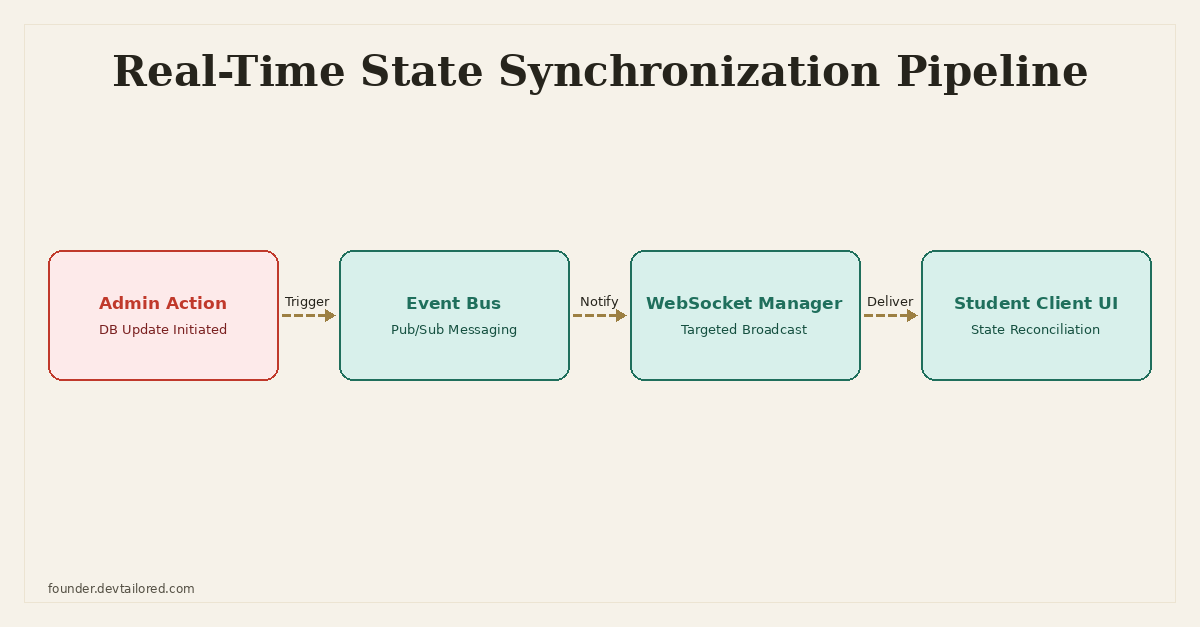
Closing the Loop: Real-Time State Synchronization in a High-Concurrency WebSocket System
Building out the Real-Time Attendance Management System was a lesson in balancing performance, data integrity, and user experience. The system handles GPS-verified student attendance, supporting over 300 concurrent WebSocket connections with sub-50ms sync times. A key feature is the automated bulk-absent processing, designed to cut administrative workload by a significant margin. But a subtle, yet critical, problem emerged after this feature went live: data consistency between the backend and the live client applications.
The Problem: Stale UI, Stale Decisions
Admins loved the bulk processing. They could mark dozens, sometimes hundreds, of students absent or present in one go. The database updated instantly, and the admin dashboard reflected the changes correctly. However, students who were actively connected via WebSockets, either sending GPS updates or simply viewing their attendance status, often saw outdated information on their end.
Imagine a student, previously marked present, is now marked absent by an admin due to a school-wide event. If that student's app still showed 'Present,' it created confusion. They might even continue sending GPS pings, and if the server-side logic wasn't careful, their client's 'perceived' present status could, in a worst-case scenario, re-mark them present in the database, effectively overwriting the admin's explicit decision. This wasn't just a UI glitch; it was a data integrity hazard that undermined the very purpose of the bulk processing feature.
I started getting reports:
- "My attendance status changed, but my app still says I'm here!"
- "The admin said they marked me absent, but then it changed back to present automatically."
These reports indicated a fundamental disconnect. The server, the database, and the client applications were not operating from a single, consistent source of truth in real time when external changes occurred. The automated bulk processing, intended to save time, was now creating more manual corrections for the admins, negating its core benefit.
Root Cause Analysis: A Missing Feedback Loop
The initial architecture for the student-facing WebSocket connections was fairly straightforward:
- Client sends GPS data: Students' apps periodically send their location.
- Server processes GPS: The server receives the GPS, verifies it against geofences, and updates the student's attendance status in the database if necessary.
- Server sends personal updates: If a student's own GPS submission changes their status, the server sends an update back to that specific student.
This worked well for self-initiated status changes. The flaw became apparent when an external actor – an admin – modified a student's status. The bulk_mark_absent endpoint, for example, would directly update the attendance_records table in PostgreSQL. After the database transaction committed, the operation was considered complete. There was no subsequent step to notify any active WebSocket connections that might be displaying the now-stale data.
The system lacked an explicit, robust mechanism for server-side events (like an admin action) to trigger broadcasts or targeted updates to affected clients. The ConnectionManager was primarily used for managing individual client-server communication and for broadcasting general announcements, not for pinpointed, data-driven state synchronization. This meant:
- No immediate client notification: Clients had no way of knowing their status had changed unless they refreshed their app or their own GPS ping triggered a status re-evaluation.
- Risk of data overwrite: If a student's app sent a GPS update after an admin change but before the client was aware of it, the server's logic (which previously might have blindly accepted or merged client-side perceived status with new GPS) could mistakenly revert the admin's decision. The server needed to be more assertive about the authoritative state.
This was a classic distributed state problem in a real-time context. The database was the source of truth, but the client-side projections of that truth were diverging, and there was no efficient path for reconciliation initiated by the backend.
The Solution: Event-Driven State Synchronization
The fix involved introducing an event-driven pattern for critical state changes and refining the WebSocket communication flow to prioritize server-side authority. The goal was to ensure that any change to a student's attendance status, regardless of its origin (student GPS or admin action), would immediately propagate to all relevant, active clients and be reconciled correctly.
Here’s how I structured the solution:
1. Centralized ConnectionManager with Enhanced Indexing
First, I ensured the ConnectionManager was robust and could quickly retrieve connections by student ID. This was already in place for general WebSocket management, but its role became even more critical for targeted broadcasts.
# app/core/websockets.py

from typing import Dict, List
from fastapi import WebSocket

class ConnectionManager:
    def __init__(self):
        self.active_connections: Dict[int, List[WebSocket]] = {}

    async def connect(self, student_id: int, websocket: WebSocket):
        await websocket.accept()
        if student_id not in self.active_connections:
            self.active_connections[student_id] = []
        self.active_connections[student_id].append(websocket)

    def disconnect(self, student_id: int, websocket: WebSocket):
        if student_id in self.active_connections:
            self.active_connections[student_id].remove(websocket)
            if not self.active_connections[student_id]:
                del self.active_connections[student_id]

    async def send_personal_message(self, message: str, websocket: WebSocket):
        await websocket.send_text(message)

    async def send_json_message(self, data: Dict, websocket: WebSocket):
        import json
        await websocket.send_text(json.dumps(data))

    async def broadcast_to_student(self, student_id: int, message: Dict):
        if student_id in self.active_connections:
            for connection in self.active_connections[student_id]:
                try:
                    await self.send_json_message(message, connection)
                except RuntimeError as e:
                    # Handle potential WebSocket connection issues (e.g., connection closed unexpectedly)
                    print(f"Error sending to student {student_id} connection: {e}")
                    # In a production system, you'd want to log this and potentially clean up the connection

manager = ConnectionManager()
The broadcast_to_student method was crucial. It allowed me to send a specific message to all active connections belonging to a particular student ID.
2. An Internal Event Bus
I implemented a simple in-memory event bus using asyncio.Queue for internal communication. For a larger, distributed system, this would be replaced by a message broker like Redis Pub/Sub or RabbitMQ. But for a single-instance FastAPI application on a VPS, asyncio.Queue was sufficient and lightweight.
# app/core/events.py

import asyncio
from typing import Any, Dict, Callable, Awaitable

class EventBus:
    def __init__(self):
        self._queue = asyncio.Queue()
        self._listeners: Dict[str, List[Callable[[Dict[str, Any]], Awaitable[None]]]] = {}

    async def publish(self, event_type: str, payload: Dict[str, Any]):
        await self._queue.put({"type": event_type, "payload": payload})

    def subscribe(self, event_type: str, listener: Callable[[Dict[str, Any]], Awaitable[None]]):
        if event_type not in self._listeners:
            self._listeners[event_type] = []
        self._listeners[event_type].append(listener)

    async def _process_event(self, event: Dict[str, Any]):
        event_type = event["type"]
        payload = event["payload"]
        if event_type in self._listeners:
            for listener in self._listeners[event_type]:
                try:
                    await listener(payload)
                except Exception as e:
                    print(f"Error processing event {event_type} with payload {payload}: {e}")

    async def start_consumer(self):
        while True:
            event = await self._queue.get()
            await self._process_event(event)
            self._queue.task_done()

event_bus = EventBus()
This EventBus class provides publish to send events and subscribe to register listeners. The start_consumer method runs as a background task, continuously pulling events from the queue and dispatching them to registered listeners.
3. Admin Actions Publishing Events
Any admin endpoint that modifies student attendance status now publishes an event to the event_bus. This decouples the act of changing the database from the act of notifying clients.
# app/api/endpoints/admin.py

from fastapi import APIRouter, Depends, HTTPException, BackgroundTasks
from sqlalchemy.ext.asyncio import AsyncSession
from app.dependencies import get_db, get_current_admin_user
from app.crud import update_student_attendance_status_batch
from app.schemas import BulkAttendanceUpdate
from app.core.events import event_bus

router = APIRouter()

@router.post("/attendance/bulk-update")
async def bulk_update_attendance(
    data: BulkAttendanceUpdate,
    db: AsyncSession = Depends(get_db),
    admin_user: dict = Depends(get_current_admin_user),
    background_tasks: BackgroundTasks = None # Use BackgroundTasks for publishing
):
    # Perform database update
    updated_student_ids = await update_student_attendance_status_batch(
        db, data.student_ids, data.new_status
    )

    # Publish an event for each updated student
    for student_id in updated_student_ids:
        background_tasks.add_task(
            event_bus.publish,
            "student_status_updated",
            {"student_id": student_id, "status": data.new_status.value}
        )

    return {"message": f"Updated status for {len(updated_student_ids)} students."}
Notice the use of BackgroundTasks. This ensures that publishing the event doesn't block the HTTP response. The admin gets an immediate confirmation, and the event processing happens asynchronously.
4. WebSocket Listener for Status Updates
A dedicated asynchronous function subscribes to student_status_updated events. When an event fires, it uses the ConnectionManager to find and notify the affected student's active WebSocket connections.
# app/core/websocket_events.py

from app.core.events import event_bus
from app.core.websockets import manager as websocket_manager
from app.schemas import AttendanceStatusEnum

async def handle_student_status_update(payload: dict):
    student_id = payload["student_id"]
    new_status = payload["status"]
    print(f"Event received: Student {student_id} status updated to {new_status}")

    message = {
        "type": "attendance_status_change",
        "data": {
            "student_id": student_id,
            "status": new_status,
            "source": "admin_override" # Important for client-side reconciliation
        }
    }
    await websocket_manager.broadcast_to_student(student_id, message)

# Register the listener when the application starts
def register_websocket_event_listeners():
    event_bus.subscribe("student_status_updated", handle_student_status_update)
This listener function is registered during application startup. It constructs a JSON message that includes the new status and, crucially, the source of the change (admin_override). This source flag is vital for the client-side logic.
5. Robust Server-Side GPS Processing
The logic for processing incoming student GPS pings was refined to prioritize the authoritative database state. Before any new GPS data could potentially alter a student's status, the server would first fetch the current status from the database.
# app/api/endpoints/websockets.py

from fastapi import APIRouter, WebSocket, WebSocketDisconnect, Depends
from sqlalchemy.ext.asyncio import AsyncSession
from app.dependencies import get_db, get_current_active_student
from app.core.websockets import manager
from app.crud import get_student_attendance_status, update_attendance_status_from_gps
from app.schemas import StudentGPSData, AttendanceStatusEnum

router = APIRouter()

@router.websocket("/ws/{student_id}")
async def websocket_endpoint(
    websocket: WebSocket,
    student_id: int,
    db: AsyncSession = Depends(get_db)
):
    # Authentication and connection management
    # ... (omitted for brevity, assume get_current_active_student is used here)
    await manager.connect(student_id, websocket)
    try:
        while True:
            data = await websocket.receive_json()
            # Assuming data is StudentGPSData Pydantic model
            gps_data = StudentGPSData(**data)

            # --- CRITICAL CHANGE: Fetch authoritative status first ---
            current_db_status = await get_student_attendance_status(db, student_id)

            # Only allow GPS to update if not explicitly overridden by admin or other conditions
            if current_db_status and current_db_status.status == AttendanceStatusEnum.absent and current_db_status.source == "admin_override":
                # Admin has marked absent, do not allow GPS to change it back automatically
                await manager.send_json_message({
                    "type": "status_update_rejected",
                    "message": "Your status is currently set by an admin and cannot be changed via GPS.",
                    "current_status": current_db_status.status.value
                }, websocket)
                continue # Skip further GPS processing for this ping

            # Process GPS and potentially update status
            new_status = await update_attendance_status_from_gps(db, student_id, gps_data)

            if new_status and new_status != current_db_status.status:
                # If status changed by GPS, send update
                await manager.send_json_message({
                    "type": "attendance_status_change",
                    "data": {
                        "student_id": student_id,
                        "status": new_status.value,
                        "source": "gps_update"
                    }
                }, websocket)

    except WebSocketDisconnect:
        manager.disconnect(student_id, websocket)
    except Exception as e:
        print(f"WebSocket error for student {student_id}: {e}")
        manager.disconnect(student_id, websocket)
The get_student_attendance_status now also returns the source of the last status change. If it was admin_override and the status is absent, subsequent GPS pings from the client are explicitly prevented from changing it back. This ensures the admin's decision holds precedence.
6. Client-Side Reconciliation
The frontend (built with Leaflet.js and a light JavaScript framework) was updated to handle these incoming attendance_status_change messages. Specifically, the source field in the message was critical. If an update arrived with source: 'admin_override', the client-side UI would immediately update and display a message indicating that the status was set by an admin, potentially even disabling local controls for status changes.
This robust client-side logic ensures that the UI not only reflects the latest authoritative state but also informs the user why their status might be fixed or unchangeable by their own actions.
Lessons Learned
This incident reinforced several key principles for building resilient real-time systems:
-
Explicit State Synchronization is Paramount: Simply persisting data to a database isn't enough in a multi-actor, real-time environment. You need explicit mechanisms to push state changes to all relevant consumers, especially when those changes originate from different parts of the system. The feedback loop between backend actions and live client UIs must be designed, not assumed.
-
Event-Driven Architecture Decouples and Scales: Using an event bus, even a simple in-memory one, effectively decouples the action (admin update) from its consequences (client notification). This makes the system more modular, easier to debug, and sets it up for scaling to a distributed message broker if needed in the future.
-
The Database is the Ultimate Source of Truth: This sounds obvious, but it's easy to get lazy and let client-side perceived state influence server decisions. Always fetch the authoritative state from your database before making decisions based on incoming client data, especially in scenarios where multiple actors can modify the same record. Prioritize the backend's view.
-
Robust Client-Side Reconciliation: Don't just push data; provide context. The
sourcefield in the WebSocket message was a small but powerful addition. It allowed the client to intelligently react, not just display, the new status. This improves user experience and prevents unexpected behavior. -
Anticipate Multi-Actor Interactions: From day one, consider how different types of users (students, admins) and automated processes will interact with the same data. Design for potential conflicts and build in clear precedence rules. In this case, admin overrides needed to take precedence over automated GPS updates.
This specific challenge was a great reminder that building real-time applications isn't just about fast connections or efficient database queries; it's about carefully orchestrating state across a distributed network of clients and servers, ensuring everyone is on the same page, all the time.
Frequently Asked Questions
Why couldn't the client just poll the server for updates?
Polling introduces significant latency and inefficiency, especially with hundreds of concurrent connections. It generates unnecessary server load and causes delayed updates. WebSockets offer immediate, push-based communication for real-time responsiveness.
How did the system prevent client-side GPS pings from overwriting admin changes?
The server's GPS processing logic was updated to always fetch the *latest authoritative status* from the database before processing new GPS data. It would only allow GPS to change a student's attendance status if they hadn't been manually overridden by an admin or if specific conditions for automatic status updates were met.
What's the role of the `ConnectionManager` in this solution?
The `ConnectionManager` serves as a centralized registry for all active WebSocket connections. It maps student IDs to their live WebSocket objects, allowing the event listener to efficiently identify and send targeted updates only to the specific clients affected by an admin action.
What if a student was offline when the admin made a change?
The event-driven system focuses on synchronizing state for *active* connections. For offline students, their status is updated directly in the database. When they next connect or open the app, their client-side UI fetches the current, authoritative status from the database, ensuring eventual consistency.
Written by Ansh Gautam
Full-stack engineer building production systems with FastAPI, React, and AI/LLM integrations. Currently looking for backend engineering & AI integration roles.