Reliable Structured Output from LLMs: Engineering for Production
Getting LLMs to consistently produce machine-readable, strictly formatted data is a significant challenge in production AI systems. This post explores advanced techniques, from schema enforcement to self-correction loops, for achieving reliable structured output.
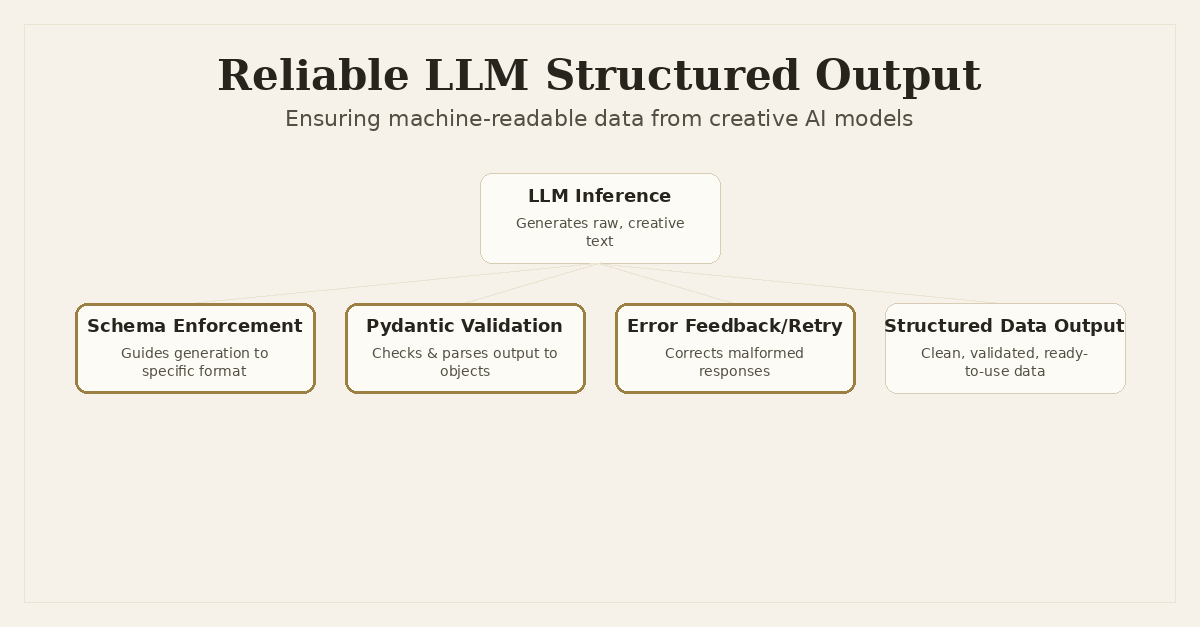
The promise of Large Language Models in production hinges on their ability to do more than just generate human-readable text. For an LLM to truly integrate into an automated workflow, it often needs to produce strictly structured, machine-readable output: valid JSON, XML, or a specific data format that a downstream system can reliably parse and act upon. This is where the rubber meets the road for AI engineering.
I've grappled with this challenge across various projects. Whether it was Snapfix needing to parse Python tracebacks into a structured diagnostic object, or Dronzer AI Gateway needing to extract parameters for tool calls from user prompts, the core problem remains: LLMs are powerful, but they are also inherently creative and probabilistic. This creativity, while fantastic for open-ended generation, becomes a liability when you need a rigid JSON object or a specific enum value. A missing comma, an extra bracket, or an invented field can bring an entire pipeline to a halt.
The Challenge of Unstructured Creativity
Think about it: an LLM's primary goal is to predict the next most probable token. It's not a formal parser or a validator. When you ask it for JSON, it tries to simulate JSON based on its training data. This often leads to subtle, yet critical, errors:
- Malformed JSON: Missing quotes, trailing commas, incorrect nesting.
- Incorrect Data Types: A number returned as a string, a boolean as 'True' instead of
true. - Schema Deviations: Extra fields, missing required fields, or fields with values outside expected constraints.
- Hallucinated Structure: The model invents entirely new keys or changes the expected structure based on context.
These issues aren't just cosmetic. They are functional blockers. If your backend expects a UserAction object with action_type as an enum of ['CREATE', 'UPDATE', 'DELETE'] and the LLM returns action_type: 'add', your code breaks. Graceful degradation is hard when the input contract is violated.
Early Attempts: Prompt Engineering
My first instinct, and likely many others', is to lean heavily on prompt engineering. This involves crafting detailed system messages and providing few-shot examples to guide the LLM's output.
For example, a system prompt might look like this:
You are a data extraction bot. Your task is to extract information about a user's request and return it as a JSON object. The JSON MUST adhere to the following schema:

```json
{
  "action_type": "string",
  "target_entity": "string",
  "details": "string"
}
Ensure action_type is one of 'CREATE', 'READ', 'UPDATE', 'DELETE'.
Example: User: "I need to update my profile picture." Output:
{
  "action_type": "UPDATE",
  "target_entity": "profile",
  "details": "profile picture"
}
This approach helps. A lot. For simple, consistent tasks, it can be sufficient. However, its limitations become apparent quickly:

1.  **Brittleness**: Small changes in the prompt, model version, or even the input phrasing can cause deviations.
2.  **Scalability**: For complex schemas with many fields, deeply nested structures, or intricate validation rules (e.g., regex patterns for specific strings), the prompt becomes unwieldy and hard to maintain.
3.  **Cost**: Detailed examples and verbose instructions consume token context, increasing API costs.
4.  **Reliability**: Even with perfect prompts, the probabilistic nature of LLMs means occasional errors are inevitable.

I learned that while prompt engineering is foundational, it's not a silver bullet for *guaranteed* structured output in production.

## Level Up: Schema-Driven Output with Pydantic

The most robust way to enforce structure is to integrate formal schema definitions directly into the LLM interaction. For Python developers, `Pydantic` is the obvious choice. It allows you to define data models using Python type hints, which can then be automatically converted to JSON Schema.

Here's how this plays out with modern LLM APIs, particularly OpenAI's, which offer native support for structured output.

### Defining Schemas with Pydantic

First, define your desired output structure using Pydantic models:

```python
from pydantic import BaseModel, Field, conlist, constr
from typing import List, Literal, Optional

class UserAction(BaseModel):
    action_type: Literal['CREATE', 'READ', 'UPDATE', 'DELETE'] = Field(description="Type of action the user wants to perform")
    target_entity: constr(min_length=1) = Field(description="The entity the user wants to interact with (e.g., 'profile', 'product', 'order')")
    details: Optional[str] = Field(default=None, description="Specific details or context about the action")

class ProductQuery(BaseModel):
    category: Optional[str] = Field(default=None, description="Category of products to search (e.g., 'electronics', 'books')")
    min_price: Optional[float] = Field(default=None, description="Minimum price for products")
    max_price: Optional[float] = Field(default=None, description="Maximum price for products")
    keywords: conlist(str, min_length=1) = Field(description="Keywords to search for in product names or descriptions")

# Example of a more complex, nested schema
class OrderDetails(BaseModel):
    order_id: str = Field(description="Unique identifier for the order")
    items: List[ProductQuery] = Field(description="List of products within the order")
    shipping_address: str = Field(description="Shipping address for the order")
    status: Literal['pending', 'shipped', 'delivered', 'cancelled'] = Field(description="Current status of the order")
These Pydantic models are powerful. They provide type checking, validation, and serialization out of the box.
Using OpenAI's response_format (JSON Mode)
For simpler, flat JSON objects, OpenAI's response_format={'type': 'json_object'} is a good start. It instructs the model to generate valid JSON, but it doesn't enforce a schema beyond that. You still rely on the prompt to describe the internal structure.
import openai
import os
from pydantic import ValidationError

# Assume client is initialized (e.g., openai.OpenAI(api_key=os.getenv("OPENAI_API_KEY")))
client = openai.OpenAI()

async def get_user_action_json_mode(user_input: str) -> Optional[UserAction]:
    try:
        response = await client.chat.completions.create(
            model="gpt-4o",
            messages=[
                {"role": "system", "content": f"You are an assistant that extracts user actions. Respond ONLY with a JSON object conforming to the schema: {UserAction.schema_json()}"},
                {"role": "user", "content": user_input}
            ],
            response_format={"type": "json_object"}
        )
        json_output = response.choices[0].message.content
        if json_output:
            # Manually parse and validate
            return UserAction.model_validate_json(json_output)
    except ValidationError as e:
        print(f"Validation error: {e}")
        return None
    except Exception as e:
        print(f"API or other error: {e}")
        return None
    return None

# Example usage (requires an async context)
# import asyncio
# async def main():
#     action = await get_user_action_json_mode("I want to create a new task for tomorrow.")
#     if action:
#         print(action.model_dump_json(indent=2))
# asyncio.run(main())
Notice that even with response_format={'type': 'json_object'}, I still explicitly included UserAction.schema_json() in the system prompt. This is crucial because json_object only guarantees syntactically valid JSON, not semantically valid JSON according to your Pydantic schema. The validation step UserAction.model_validate_json(json_output) is what truly enforces the schema.
Using tool_choice with functions for Strict Schema Enforcement
For truly strict and complex schema enforcement, especially when you need specific fields, enums, and types, OpenAI's tool_choice with functions (often referred to as 'function calling') is the gold standard. This mechanism allows you to define a 'tool' that the LLM can 'call', where the tool's parameters are described by a JSON Schema. The LLM is then prompted to generate the arguments for this tool call, which must conform to the schema.
Here's how you'd define a tool from our UserAction Pydantic model:
# ... Pydantic models as defined above ...

def get_tool_definitions(models: List[BaseModel]) -> List[dict]:
    tools = []
    for model in models:
        tools.append({
            "type": "function",
            "function": {
                "name": model.__name__,
                "description": model.__doc__ or f"Extracts data for {model.__name__}.",
                "parameters": model.model_json_schema()
            }
        })
    return tools

async def get_structured_output_function_call(user_input: str, output_model: BaseModel) -> Optional[BaseModel]:
    tool_definitions = get_tool_definitions([output_model])

    try:
        response = await client.chat.completions.create(
            model="gpt-4o",
            messages=[
                {"role": "system", "content": "You are an intelligent assistant that extracts structured information from user queries using provided tools."},
                {"role": "user", "content": user_input}
            ],
            tools=tool_definitions,
            tool_choice={"type": "function", "function": {"name": output_model.__name__}} # Force the model to use this specific tool
        )

        tool_calls = response.choices[0].message.tool_calls
        if tool_calls and tool_calls[0].function.name == output_model.__name__:
            function_args_str = tool_calls[0].function.arguments
            # Validate and parse using Pydantic
            return output_model.model_validate_json(function_args_str)

    except ValidationError as e:
        print(f"Validation error during function call parsing: {e}")
        return None
    except Exception as e:
        print(f"API or other error: {e}")
        return None
    return None

# Example usage:
# async def main_function_call():
#     action = await get_structured_output_function_call("I need to delete my old account data.", UserAction)
#     if action:
#         print(action.model_dump_json(indent=2))
#     query = await get_structured_output_function_call("Find me books about AI for under $50.", ProductQuery)
#     if query:
#         print(query.model_dump_json(indent=2))
# asyncio.run(main_function_call())
This tool_choice method is far more reliable. The LLM is explicitly trained to generate arguments that fit the provided JSON Schema for the function call. If it deviates, the API often throws an error, or the model's confidence in that generation path is significantly reduced, leading to better results. This is what I often use in Dronzer AI Gateway for routing requests to specific tools or extracting parameters for custom actions.
Beyond Native Support: Grammar-Based Enforcement
What if you're using a model that doesn't have native tool_choice or response_format support? This is often the case with local models served via Ollama, or older / more niche LLM APIs. In these scenarios, grammar-based enforcement libraries can be a lifesaver.
Tools like lm-format-enforcer or Outlines (which Snapfix uses for some local model integrations) work by constraining the token generation process at a much lower level. Instead of just prompting the model, they hook into the LLM's decoding process and only allow tokens that adhere to a specified grammar (e.g., a JSON schema, a regex, or a custom BNF grammar).
The core idea is that after each token is generated, the grammar parser checks which subsequent tokens would keep the output valid according to the schema. It then masks out all other invalid tokens from the LLM's vocabulary, forcing the LLM to pick only valid continuations. This guarantees syntactical correctness.
While integrating these libraries requires a bit more boilerplate, they offer unparalleled control for models without native support. The trade-off is often slightly increased latency due to the additional processing per token and potentially reduced creativity if the grammar is too restrictive.
The Safety Net: Validation and Self-Correction Loops
Even with the best schema enforcement, LLMs can still occasionally misbehave. Network issues, model quirks, or genuinely ambiguous input can lead to malformed output that slips through. This is where a robust post-processing validation and self-correction loop becomes critical for production systems.
The process typically involves:
- Attempt Generation: Call the LLM with schema enforcement.
- Validate Output: Use Pydantic's
model_validate_json(or similar) to parse and validate the response. - Handle Success: If valid, proceed.
- Handle Failure (Self-Correction): If validation fails, don't just throw an error. Instead, construct a new prompt that includes:
- The original user query.
- The LLM's previous (malformed) output.
- The specific validation error message (e.g., from Pydantic).
- An instruction to correct the error and regenerate the output.
- Retry: Send this new prompt to the LLM. Limit retries to prevent infinite loops.
This creates a resilient feedback mechanism, allowing the LLM to learn from its own mistakes in real-time. Here's a conceptual example:
# ... imports and client initialization ...

MAX_RETRIES = 3

async def get_robust_structured_output(user_input: str, output_model: BaseModel) -> Optional[BaseModel]:
    tool_definitions = get_tool_definitions([output_model])
    messages = [
        {"role": "system", "content": "You are an intelligent assistant that extracts structured information from user queries using provided tools. If you make a mistake in formatting, you will be given feedback to correct it."},
        {"role": "user", "content": user_input}
    ]

    for attempt in range(MAX_RETRIES):
        try:
            response = await client.chat.completions.create(
                model="gpt-4o",
                messages=messages,
                tools=tool_definitions,
                tool_choice={"type": "function", "function": {"name": output_model.__name__}}
            )

            tool_calls = response.choices[0].message.tool_calls
            if tool_calls and tool_calls[0].function.name == output_model.__name__:
                function_args_str = tool_calls[0].function.arguments

                # Attempt Pydantic validation
                parsed_output = output_model.model_validate_json(function_args_str)
                return parsed_output # Success!

        except ValidationError as e:
            error_message = str(e)
            print(f"Attempt {attempt+1}: Validation error: {error_message}")
            # Append feedback to messages for self-correction
            messages.append({"role": "assistant", "tool_calls": tool_calls}) # Include previous, incorrect tool call
            messages.append({"role": "tool", "tool_call_id": tool_calls[0].id, "content": f"Error: {error_message}. Please correct the JSON arguments to match the schema and try again."})

        except Exception as e:
            print(f"Attempt {attempt+1}: API or other error: {e}")
            # For API errors, just retry without specific feedback unless it's a known formatting issue

    print(f"Failed to get valid structured output after {MAX_RETRIES} attempts.")
    return None

# Example usage:
# async def main_robust():
#     # Simulate a tricky input or a model that might occasionally err
#     tricky_input = "I need to update my profile. I also want to add a new product named 'Fancy Widget' at $99. But actually, just the profile update."
#     action = await get_robust_structured_output(tricky_input, UserAction)
#     if action:
#         print(action.model_dump_json(indent=2))
#     else:
#         print("Could not extract user action reliably.")
# asyncio.run(main_robust())
This self-correction loop significantly boosts the robustness of your AI integration. It acknowledges the inherent fallibility of LLMs and builds a programmatic way to recover from common errors without human intervention.
Architectural Considerations for Production
Implementing reliable structured output isn't just about a single function call; it has architectural implications, especially in a system like Dronzer AI Gateway.
- Centralized Schema Management: Store your Pydantic models in a well-defined, accessible location. In
Dronzer, these might be associated with specific tool definitions or API endpoints, ensuring consistency across different LLM interactions. - LLM Provider Agnosticism: While OpenAI's function calling is powerful,
Dronzer AI Gatewayneeds to support 45+ providers. This means abstracting the schema enforcement. For providers without native function calling, the gateway might fall back to strong prompt engineering combined with grammar-based enforcement or more aggressive post-processing validation and self-correction loops. - Performance Monitoring: Structured output often involves more complex API calls (e.g., function calling instead of simple chat completions) and additional validation steps. Monitor latency and token usage. The self-correction loop, while robust, adds latency with each retry. Balance reliability needs with performance requirements.
- Error Handling and Alerting: When structured output fails even after retries, it's a critical error. Ensure proper logging and alerting mechanisms are in place. This could indicate a fundamental misunderstanding by the LLM, a breaking change in the model, or an invalid schema definition.
- Version Control for Schemas: Treat your Pydantic models (and their JSON Schema representations) as code. Version control them, and ensure schema changes are deployed carefully, as they directly impact the LLM's expected output contract.
Conclusion
Moving LLM applications from impressive demos to reliable production systems demands a rigorous approach to data integrity. Relying solely on the LLM's 'best effort' to format output correctly is a recipe for instability.
By leveraging tools like Pydantic for schema definition, employing native API features like OpenAI's tool_choice for strict enforcement, and implementing resilient self-correction loops, we can engineer LLM integrations that consistently deliver machine-readable, actionable data. This is how we build truly dependable AI applications that seamlessly integrate into our existing software stacks, transforming creative language models into reliable, intelligent components.
Frequently Asked Questions
Why is getting structured output from LLMs difficult?
LLMs are inherently creative and probabilistic, often deviating from strict formatting instructions due to their generative nature, leading to malformed JSON or incorrect data types that break downstream systems.
How does Pydantic help in achieving structured LLM output?
Pydantic allows defining clear data schemas in Python. This schema can be converted to JSON Schema, which can then be passed to LLM APIs (like OpenAI's `response_format` or `tool_choice`) to guide the model's generation, and then validate the incoming response.
What is a self-correction loop for LLM output?
A self-correction loop involves validating an LLM's output against a defined schema. If validation fails, the error message and the original malformed output are fed back to the LLM, prompting it to correct its mistake in a subsequent generation attempt.
When should I use grammar-based enforcement over native API features?
Grammar-based enforcement libraries (like `lm-format-enforcer` or `Outlines`) are valuable when working with local models (e.g., Ollama) or LLM APIs that lack native JSON schema or tool-calling features, providing a way to constrain output at the token generation level.
Written by Ansh Gautam
Full-stack engineer building production systems with FastAPI, React, and AI/LLM integrations. Currently looking for backend engineering & AI integration roles.