Unraveling the Maze: Distributed Tracing for Microservices with OpenTelemetry
Debugging across microservices is a nightmare. Distributed tracing, particularly with OpenTelemetry, provides the visibility needed to understand complex request flows, pinpoint bottlenecks, and resolve issues faster.
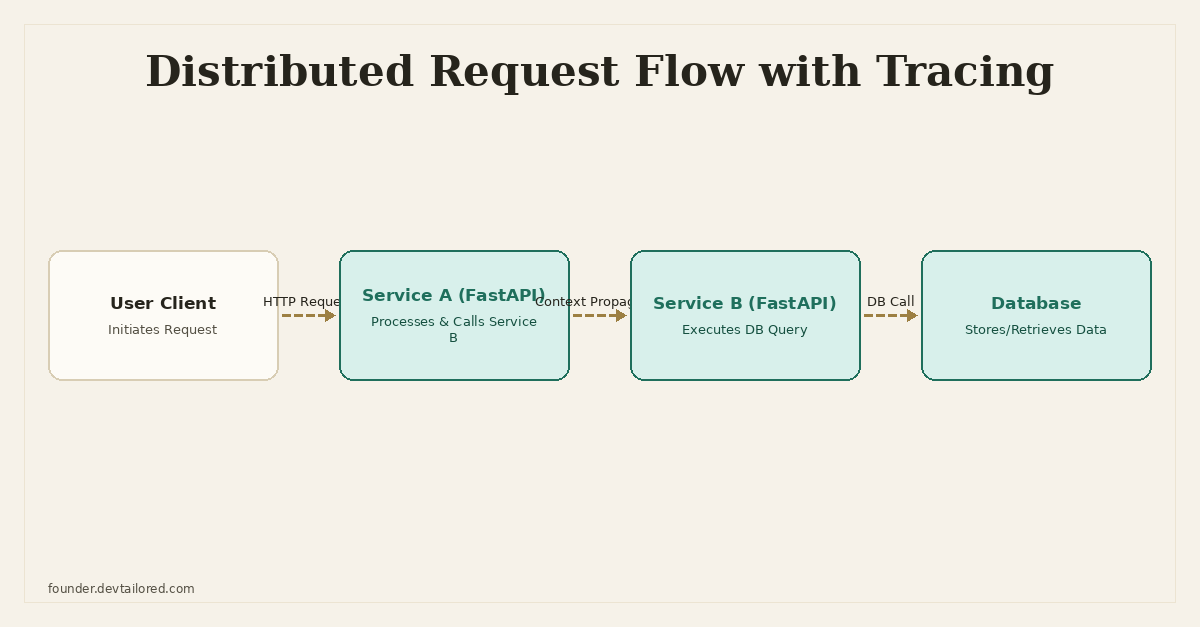
Unraveling the Maze: Distributed Tracing for Microservices with OpenTelemetry
When you're running a single monolithic application, debugging is usually a matter of digging through logs in one place. You can follow a request's path from entry to exit, examining function calls, database queries, and external API interactions within a single codebase and a unified log stream. It's not always easy, but at least all the pieces are typically in one spot.
But as soon as you break that monolith into microservices, things get complicated fast. Suddenly, a single user request might traverse three, five, or even ten different services, each running on its own server, written in different languages, with independent log files. When something goes wrong – a request times out, an error occurs, or performance degrades – figuring out where and why becomes a debugging nightmare.
I've spent many late nights trying to piece together the story of a failing request. It often involves:
- SSHing into multiple servers to grep through individual log files.
- Trying to manually correlate timestamps across services, hoping they're synchronized.
- Guessing which upstream service might have sent bad data or introduced a delay.
- Struggling to visualize the actual flow of execution because the logs are fragmented.
This is a massive drain on engineering time and often leads to incomplete root cause analyses. This kind of chaos is exactly what distributed tracing is designed to solve.
The Debugging Nightmare in Distributed Systems
Let's be concrete about the problems. Imagine a user makes a request to GET /order/{id}. This might involve:
- An API Gateway service authenticating the request.
- An Order Service fetching basic order details from its database.
- The Order Service calling a Product Service to enrich product information.
- The Product Service calling an Inventory Service to check stock levels.
- The Order Service calling a User Profile Service to get customer details.
- Finally, the API Gateway aggregating all this and returning it to the user.
If that request takes 2 seconds instead of 200 milliseconds, where's the delay? Is it the database query in the Order Service? Is the Product Service slow to respond? Is the Inventory Service experiencing high load? Without a clear, unified view of the request's journey, you're essentially blind. Logs tell you what happened in each service, but not how it connects to the overall transaction across service boundaries.
Enter Distributed Tracing
Distributed tracing provides the much-needed visibility into these complex, multi-service transactions. It's a method of monitoring requests as they propagate through a distributed system, giving you an end-to-end view of an operation. Think of it as a detailed itinerary for a single request, showing every stop it made, how long it stayed, and what happened at each location.
The core concepts are straightforward:
- Trace: The complete execution path of a single request or transaction through a distributed system. It's identified by a unique
Trace IDthat stays constant throughout the request's entire journey. - Span: A single logical unit of work within a trace. Each span represents an operation, like an HTTP request, a database query, a function call, or even a message queue operation. Spans have a
Span ID, aStart Time, anEnd Time, and can contain attributes (key-value pairs) and events (timestamps with messages). - Parent-Child Relationships: Spans are organized hierarchically. An operation that calls another operation becomes the parent of the child operation's span. For example, an HTTP request span might be the parent of a database query span.
- Context Propagation: This is the critical mechanism that links spans across different services. When one service calls another, the
Trace IDand theSpan IDof the calling service's current span (the parent) are passed along, usually in HTTP headers or message queue metadata. The receiving service then uses this information to create a new child span, ensuring the entire trace is correctly stitched together.
By collecting and visualizing these traces, you can literally see the flow of execution, identify which services are involved, measure the latency of each operation, and quickly pinpoint where errors originated.
Why OpenTelemetry?
Before OpenTelemetry, there were several tracing systems (e.g., Zipkin, Jaeger, Google Cloud Trace, AWS X-Ray), each with its own SDKs and data formats. This led to vendor lock-in and a fragmented ecosystem. If you decided to switch your observability backend, you often had to rewrite your instrumentation.
OpenTelemetry (OTel) emerged to solve this. It's a vendor-neutral, open-source observability framework that provides a unified set of APIs, SDKs, and tools to instrument, generate, collect, and export telemetry data (traces, metrics, and logs). The key benefits are:
- Standardization: A single standard for instrumentation across languages and vendors.
- Portability: You can change your observability backend (e.g., Jaeger, Grafana Tempo, Datadog) without re-instrumenting your code.
- Completeness: OTel covers not just tracing, but also metrics and logs, aiming for a holistic observability solution.
- Community Support: Backed by the Cloud Native Computing Foundation (CNCF), it has a large and active community.
For Python microservices, OpenTelemetry is the clear choice for implementing distributed tracing.
Implementing OpenTelemetry in Python/FastAPI
Let's walk through how to set up OpenTelemetry in a Python FastAPI application. We'll instrument two services, service-a and service-b, where service-a calls service-b, and service-b makes a database query. We'll use httpx for inter-service communication and SQLAlchemy for database interactions.
1. Installation
First, install the necessary OpenTelemetry packages. We'll need the SDK, an OTLP exporter (to send data to a collector like Jaeger), and instrumentation libraries for FastAPI, httpx, and SQLAlchemy.
pip install opentelemetry-sdk opentelemetry-exporter-otlp opentelemetry-instrumentation-fastapi opentelemetry-instrumentation-httpx opentelemetry-instrumentation-sqlalchemy uvicorn fastapi httpx sqlalchemy psycopg2-binary
2. Basic OpenTelemetry Configuration
It's good practice to centralize your OpenTelemetry setup. Create a file, say, otel_config.py.
# otel_config.py

from opentelemetry import trace
from opentelemetry.sdk.resources import Resource
from opentelemetry.sdk.trace import TracerProvider
from opentelemetry.sdk.trace.export import BatchSpanProcessor
from opentelemetry.exporter.otlp.proto.grpc.trace_exporter import OTLPSpanExporter
from opentelemetry.instrumentation.fastapi import FastAPIInstrumentor
from opentelemetry.instrumentation.httpx import HTTPXClientInstrumentor
from opentelemetry.instrumentation.sqlalchemy import SQLAlchemyInstrumentor


def configure_opentelemetry(service_name: str):
    # Resource identifies the application in your tracing backend
    resource = Resource.create({
        "service.name": service_name,
        "application": "microservice-demo"
    })

    # Configure the TracerProvider
    provider = TracerProvider(resource=resource)
    trace.set_tracer_provider(provider)

    # Configure OTLP exporter to send traces to a collector (e.g., Jaeger)
    otlp_exporter = OTLPSpanExporter(endpoint="http://localhost:4317", insecure=True)
    span_processor = BatchSpanProcessor(otlp_exporter)
    provider.add_span_processor(span_processor)

    # Instrument libraries
    FastAPIInstrumentor.instrument()
    HTTPXClientInstrumentor().instrument()
    SQLAlchemyInstrumentor().instrument()

    print(f"OpenTelemetry configured for service: {service_name}")


# Example usage in a main application file:
# from otel_config import configure_opentelemetry
# configure_opentelemetry("my-service-name")
Here's what's happening:
Resource: This object provides metadata about the service emitting telemetry.service.nameis crucial for identifying your service in the tracing UI.TracerProvider: This is the entry point for all tracing activities. We set it as the global provider.OTLPSpanExporter: This exporter sends your collected spans to an OpenTelemetry Collector or directly to an observability backend that supports OTLP (OpenTelemetry Protocol).http://localhost:4317is the default gRPC port for the OTLP receiver.BatchSpanProcessor: This processor batches spans before exporting them, which is more efficient than sending them one by one.FastAPIInstrumentor.instrument(): This automatically instruments your FastAPI application, creating spans for incoming requests and propagating trace context.HTTPXClientInstrumentor().instrument(): This instrumentshttpxclients, ensuring that when your service makes an outgoing HTTP call, the trace context (Trace ID, Span ID) is correctly injected into the request headers for the downstream service to pick up.SQLAlchemyInstrumentor().instrument(): This instruments SQLAlchemy, creating spans for database queries, showing the query itself and its execution time.
3. Service A (Calling Service B)
Let's create service_a.py:
# service_a.py

import uvicorn
from fastapi import FastAPI
import httpx
from opentelemetry import trace

from otel_config import configure_opentelemetry

configure_opentelemetry("service-a")

app = FastAPI()
tracer = trace.get_tracer(__name__)

@app.get("/items/{item_id}")
async def read_item(item_id: int):
    # Manual span for a specific operation within the request
    with tracer.start_as_current_span("fetch_item_details") as span:
        span.set_attribute("item.id", item_id)

        # httpx client is automatically instrumented by HTTPXClientInstrumentor
        async with httpx.AsyncClient() as client:
            response = await client.get(f"http://localhost:8001/users/{item_id}")
            response.raise_for_status()
            user_data = response.json()

        # Add attributes to the current span
        span.set_attribute("user.status_code", response.status_code)
        span.set_attribute("user.name", user_data.get("name"))

        return {"item_id": item_id, "user_info": user_data}

if __name__ == "__main__":
    uvicorn.run(app, host="0.0.0.0", port=8000)
Notice the with tracer.start_as_current_span(...) block. While automatic instrumentation handles the FastAPI request and the httpx call, you'll often want to create manual spans for specific business logic. This helps you get more granular detail within your traces, clearly segmenting parts of your code that are important for performance analysis.
4. Service B (Database Interaction)
Now, service_b.py, which will interact with a PostgreSQL database (ensure you have one running or use SQLite for simplicity for testing).
# service_b.py

import uvicorn
from fastapi import FastAPI
from sqlalchemy import create_engine, Column, Integer, String
from sqlalchemy.ext.declarative import declarative_base
from sqlalchemy.orm import sessionmaker
from opentelemetry import trace

from otel_config import configure_opentelemetry

configure_opentelemetry("service-b")

app = FastAPI()
tracer = trace.get_tracer(__name__)

# Database setup (using SQLite for simplicity here, replace with PostgreSQL for real world)
SQLALCHEMY_DATABASE_URL = "sqlite:///./sql_app.db"
# For PostgreSQL:
# SQLALCHEMY_DATABASE_URL = "postgresql://user:password@host:port/dbname"

engine = create_engine(SQLALCHEMY_DATABASE_URL)
SessionLocal = sessionmaker(autocommit=False, autoflush=False, bind=engine)
Base = declarative_base()

class User(Base):
    __tablename__ = "users"
    id = Column(Integer, primary_key=True, index=True)
    name = Column(String, index=True)
    email = Column(String, unique=True, index=True)

Base.metadata.create_all(bind=engine)

def get_db():
    db = SessionLocal()
    try:
        yield db
    finally:
        db.close()

# Add some initial data if the table is empty
with SessionLocal() as db:
    if db.query(User).count() == 0:
        db.add(User(id=1, name="Ansh Gautam", email="ansh@example.com"))
        db.add(User(id=2, name="Jane Doe", email="jane@example.com"))
        db.commit()
        print("Added initial users.")


@app.get("/users/{user_id}")
async def read_user(user_id: int):
    with SessionLocal() as db:
        with tracer.start_as_current_span("get_user_from_db") as span:
            span.set_attribute("db.user_id", user_id)
            user = db.query(User).filter(User.id == user_id).first()
            if user:
                return {"id": user.id, "name": user.name, "email": user.email}
            return {"message": "User not found"}, 404

if __name__ == "__main__":
    uvicorn.run(app, host="0.0.0.0", port=8001)
Here, the SQLAlchemyInstrumentor automatically wraps the database operations, creating spans for them. I've also added a manual span around the database query to provide additional context (get_user_from_db).
5. Running the Services and a Collector
To see this in action, you'll need an OpenTelemetry Collector and a tracing backend like Jaeger. The easiest way to get these is via Docker:
docker run -d --name jaeger \
  -e COLLECTOR_OTLP_ENABLED=true \
  -p 16686:16686 \
  -p 4317:4317 \
  jaegertracing/all-in-one:latest
This command starts a Jaeger container, exposing:
16686: The Jaeger UI.4317: The OTLP gRPC port for the collector.
Now, run your services in separate terminals:
# Terminal 1
python service_b.py

# Terminal 2
python service_a.py
Then, make a request to service-a:
curl http://localhost:8000/items/1
Navigate to the Jaeger UI at http://localhost:16686. You should see traces for service-a and service-b. When you select a trace, you'll get a waterfall diagram showing the entire request flow, including the FastAPI request spans, the httpx call, and the SQLAlchemy database query, all linked together with correct timing and parent-child relationships.
Understanding the Trace View
In the Jaeger UI (or any other compatible tracing backend), you'll see a visual representation of the trace:
- The root span for the
GET /items/{item_id}request inservice-a. - A child span for
fetch_item_details(our manual span). - Another child span representing the
httpxGETrequest fromservice-atoservice-b. - The
GET /users/{user_id}request inservice-b(which receives the trace context). - A child span for
get_user_from_db(our manual span inservice-b). - A further child span generated by the SQLAlchemy instrumentation, showing the actual
SELECTquery executed against the database.
Each span will display its duration, attributes (like http.method, http.status_code, db.statement), and potentially events. This granular detail is invaluable for:
- Performance Analysis: Quickly spot which operation or service is taking the longest.
- Error Isolation: If an error occurs, the span will often be marked as errored, and you can see exactly where in the call stack it happened.
- Dependency Mapping: Understand the real-time dependencies between your services.
- Service Health: Monitor the health and latency of individual components.
Challenges and Considerations
While incredibly powerful, distributed tracing isn't without its considerations:
- Performance Overhead: Instrumentation adds a small amount of overhead. While OpenTelemetry is optimized for minimal impact, it's still a factor to consider, especially in extremely high-throughput systems.
- Sampling: Not every trace needs to be collected. For very busy systems, you might implement sampling strategies to only trace a percentage of requests, or trace all requests that meet certain criteria (e.g., requests that error out, or requests from specific users). The OpenTelemetry SDK supports various samplers.
- Storage Costs: Storing vast amounts of trace data can be expensive. This is another reason sampling is important.
- Context Propagation Mechanism: While HTTP headers (like
traceparentandtracestate) are common, you need to ensure your message queues (e.g., Kafka, RabbitMQ) and other communication mechanisms also propagate the trace context correctly. OpenTelemetry provides instrumentation for many of these. - Choosing a Backend: While OpenTelemetry provides the instrumentation, you still need a backend (like Jaeger, Grafana Tempo, Datadog, New Relic) to store, visualize, and analyze your traces. Each has its own strengths and pricing models.
Conclusion
Adopting distributed tracing with OpenTelemetry is a significant step towards achieving true observability in a microservices environment. It transforms the daunting task of debugging across service boundaries into a manageable, visual process. I've personally seen the benefits of being able to immediately pinpoint a slow database query or a failing external API call in a complex system, saving hours of investigation.
It's not just about finding bugs; it's about deeply understanding how your system behaves under load, identifying performance bottlenecks before they become critical, and ultimately building more resilient and performant applications. If you're running microservices and aren't using distributed tracing, you're flying blind. It's time to light up those dark corners.
Frequently Asked Questions
What problem does distributed tracing solve in microservices?
Distributed tracing solves the problem of debugging and understanding request flows across multiple independent services. Without it, pinpointing latency, errors, or the exact path a request takes becomes extremely difficult due to scattered logs and service boundaries.
What are the core components of a distributed trace?
A distributed trace consists of a unique Trace ID that follows a request through the system, and multiple Spans. Each span represents a single operation within that request (e.g., an HTTP call, a database query, a function execution) and has its own Span ID, along with parent-child relationships.
How does OpenTelemetry help with distributed tracing?
OpenTelemetry provides a vendor-neutral set of APIs, SDKs, and instrumentation libraries to generate, collect, and export telemetry data (traces, metrics, logs) from your applications. It standardizes how services are instrumented, making it easier to integrate with various observability backends.
What are the key steps to implement OpenTelemetry tracing in a Python FastAPI application?
Key steps include installing OpenTelemetry SDK and relevant instrumentation packages (e.g., `opentelemetry-instrumentation-fastapi`, `opentelemetry-instrumentation-httpx`, `opentelemetry-instrumentation-sqlalchemy`), configuring a `TracerProvider` with a `SpanProcessor` and an `Exporter`, applying middleware for automatic request tracing, and manually creating spans for specific business logic.
Written by Ansh Gautam
Full-stack engineer building production systems with FastAPI, React, and AI/LLM integrations. Currently looking for backend engineering & AI integration roles.