Orchestrating Adaptive LLM Workflows: Dynamic Tool Use and Self-Correction
Building robust LLM applications requires more than simple prompt chains; it demands dynamic adaptation, intelligent tool use, and self-correction. I'll break down how to architect systems that can re-plan and recover from errors.
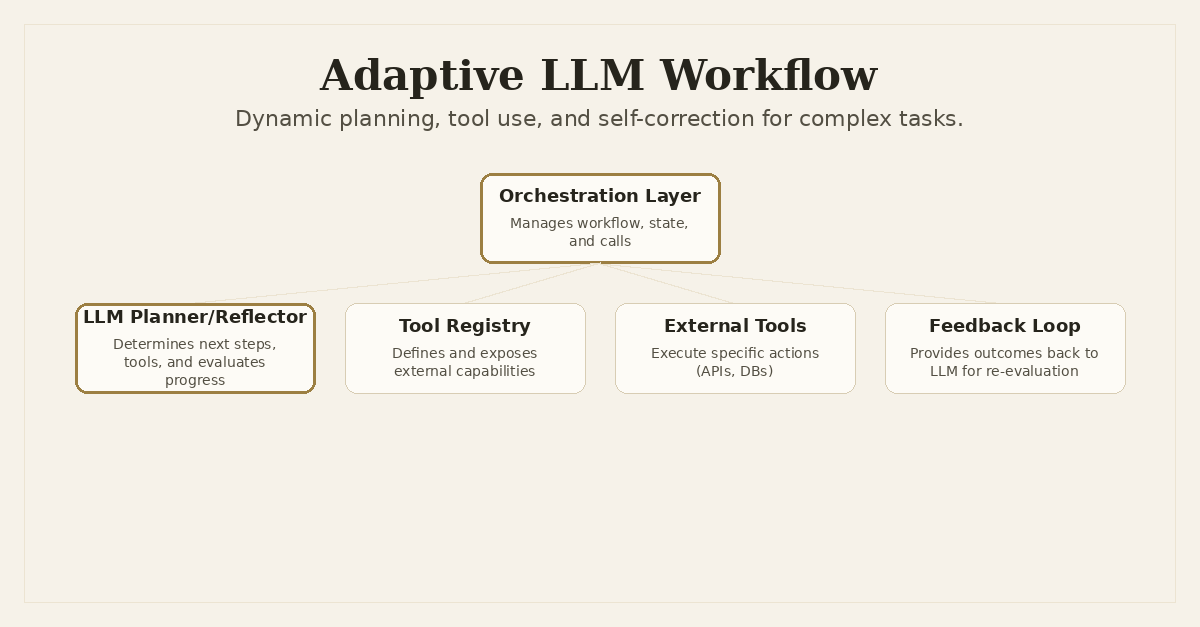
Orchestrating Adaptive LLM Workflows: Dynamic Tool Use and Self-Correction
Building truly intelligent applications with Large Language Models goes beyond a single API call or a fixed prompt chain. The real world is dynamic and unpredictable. Inputs aren't always clean, external tools can fail, and even the most sophisticated LLMs make mistakes. My experience building systems like the Dronzer AI Gateway has made it clear: for LLMs to handle complex, multi-step tasks reliably, they need to be adaptive. They need to be able to dynamically plan, use tools, and, crucially, self-correct when things go sideways.
The Problem with Static Chains
Many initial LLM integrations start with a straightforward sequence: take input, pass to LLM with a prompt, get output. If the task is simple, this works fine. But what happens when the task involves multiple steps, external data fetching, or conditional logic? A static chain, where you hardcode the sequence of prompts and tool calls, quickly becomes brittle.
Imagine an LLM application designed to process a user request like, "Find me the cheapest flight from New York to London next Tuesday and book it." A static chain might look like this:
- Prompt LLM: Extract origin, destination, date.
- Call Flight API: Search for flights.
- Prompt LLM: Summarize results and ask for confirmation.
- Call Booking API: Book the flight.
This seems reasonable, but it breaks down fast:
- What if the LLM misinterprets "next Tuesday"? The API call will fail.
- What if the Flight API returns no results? The LLM might still try to summarize empty data.
- What if the Booking API requires specific details not initially extracted? The static chain has no way to go back and ask for more information.
- What if the user changes their mind mid-way? The system needs to adapt.
These systems lack resilience. They assume a perfect, linear path, which rarely exists in production. We need LLMs that can reason about the task, adapt their approach, and recover from errors.
Beyond Static Chains: Adaptive Orchestration
The core idea behind adaptive LLM workflows is to imbue the system with a higher level of intelligence, moving the decision-making from hardcoded logic into the LLM itself, guided by an orchestration layer. This involves a few key principles:
- Task Decomposition: Instead of tackling the whole problem at once, the LLM breaks it down into smaller, manageable sub-tasks.
- Dynamic Tool Selection: The LLM doesn't just generate text; it decides which external tools to call, when, and with what arguments.
- Intermediate Reflection & Self-Correction: After each step or tool call, the LLM evaluates the outcome. If it's not what was expected, it reflects on the failure, identifies the problem, and formulates a new plan or adjusts its approach.
- Multi-Model Strategy: Different LLMs excel at different tasks. An adaptive system can leverage specialized models for specific sub-tasks – one for planning, another for summarization, another for code generation.
This approach transforms the LLM from a simple text generator into a dynamic planner and executor, capable of navigating complex tasks with far greater robustness.
Architectural Components of an Adaptive Workflow
Building this requires a thoughtful architecture. Here are the key components I've found essential:
1. The Orchestration Layer
This is the brain of the operation. It's responsible for:
- Managing Workflow State: Keeping track of the current step, previous outputs, and any user context.
- Invoking LLMs: Calling different LLMs (via a platform like Dronzer AI Gateway) for planning, execution, and reflection.
- Executing Tools: Receiving tool call instructions from the LLM and executing them, then feeding the results back.
- Error Handling: Catching exceptions from tool calls or LLM responses and feeding them back into the LLM for self-correction.
Dronzer AI Gateway is particularly well-suited here. Its ability to route requests across 45+ LLM providers with task-aware intelligence and bulletproof failover provides a robust foundation. The orchestration logic sits on top of Dronzer, using its capabilities to abstract away the complexities of interacting with various LLM APIs.
2. The Tool Registry
For an LLM to dynamically select tools, it needs to know what tools are available and how to use them. A tool registry defines these capabilities.
Each tool should have:
- A Name: A unique identifier.
- A Description: A clear, concise explanation of what the tool does.
- Parameters: A schema (e.g., JSON Schema) describing the input arguments the tool expects.
- Implementation: The actual code that executes the tool (e.g., making an API call, querying a database).
This registry is then provided to the LLM within the prompt, allowing it to "reason" about which tool is appropriate for the current sub-task.
3. State Management
Adaptive workflows are inherently stateful. The LLM needs to remember previous turns, intermediate results, and the overall goal. This state can be managed in a database (like PostgreSQL with Dronzer AI Gateway), a cache, or even within the LLM's context window for shorter, simpler interactions. For long-running, complex tasks, externalizing state is critical.
4. Evaluation and Feedback Loop
How does the system know if it's succeeding? This is where evaluation comes in. For simple tasks, a regex or keyword check might suffice. For complex tasks, another LLM can act as a "critic," evaluating the output of a previous step against the original goal. This feedback is then fed back into the planning LLM for self-correction.
Implementing Adaptive Orchestration: A Code Example
Let's look at a simplified Python example demonstrating how an orchestrator might work, leveraging LiteLLM (which Dronzer AI Gateway uses internally) to abstract model calls and integrate tools.
First, define some tools:
import json
from typing import Callable, Dict, Any, List
from litellm import completion

# Define a simple tool registry
def get_current_weather(location: str, unit: str = "fahrenheit") -> str:
    """
    Get the current weather in a given location.
    Args:
        location (str): The city and state, e.g., "San Francisco, CA"
        unit (str): The unit of temperature. Can be 'celsius' or 'fahrenheit'.
    """
    # In a real system, this would call an external weather API
    if "san francisco" in location.lower():
        return json.dumps({"location": location, "temperature": "72", "unit": unit, "forecast": "Sunny"})
    elif "new york" in location.lower():
        return json.dumps({"location": location, "temperature": "65", "unit": unit, "forecast": "Cloudy"})
    else:
        return json.dumps({"location": location, "temperature": "unknown", "unit": unit, "forecast": "unknown"})

def get_stock_price(ticker: str) -> str:
    """
    Get the current stock price for a given ticker symbol.
    Args:
        ticker (str): The stock ticker symbol, e.g., "AAPL"
    """
    # In a real system, this would call a stock market API
    if ticker.upper() == "AAPL":
        return json.dumps({"ticker": ticker, "price": "175.25", "currency": "USD"})
    elif ticker.upper() == "GOOG":
        return json.dumps({"ticker": ticker, "price": "1.42.10", "currency": "USD"})
    else:
        return json.dumps({"ticker": ticker, "price": "N/A"})

tools_map: Dict[str, Callable] = {
    "get_current_weather": get_current_weather,
    "get_stock_price": get_stock_price,
}

tools_schema: List[Dict[str, Any]] = [
    {
        "type": "function",
        "function": {
            "name": "get_current_weather",
            "description": "Get the current weather in a given location",
            "parameters": {
                "type": "object",
                "properties": {
                    "location": {"type": "string", "description": "The city and state, e.g., San Francisco, CA"},
                    "unit": {"type": "string", "enum": ["celsius", "fahrenheit"], "description": "The unit of temperature"}
                },
                "required": ["location"]
            }
        }
    },
    {
        "type": "function",
        "function": {
            "name": "get_stock_price",
            "description": "Get the current stock price for a given ticker symbol",
            "parameters": {
                "type": "object",
                "properties": {
                    "ticker": {"type": "string", "description": "The stock ticker symbol, e.g., AAPL"}
                },
                "required": ["ticker"]
            }
        }
    }
]
Now, the orchestrator. This function will use the LLM to decide if a tool needs to be called, execute it, and then potentially feed the result back to the LLM for further steps or final response generation.
import json
from typing import Dict, Any, List, Optional
from litellm import completion

class AdaptiveLLMOrchestrator:
    def __init__(self, model: str = "gpt-4-turbo", tools_map: Dict[str, Callable] = None, tools_schema: List[Dict[str, Any]] = None):
        self.model = model
        self.tools_map = tools_map if tools_map is not None else {}
        self.tools_schema = tools_schema if tools_schema is not None else []
        self.conversation_history: List[Dict[str, str]] = []

    def add_message(self, role: str, content: str):
        self.conversation_history.append({"role": role, "content": content})

    def _call_llm(self, messages: List[Dict[str, str]], tools: Optional[List[Dict[str, Any]]] = None) -> Dict[str, Any]:
        try:
            response = completion(
                model=self.model,
                messages=messages,
                tools=tools,
                tool_choice="auto" if tools else None # Allow LLM to choose a tool if available
            )
            return response.choices[0].message
        except Exception as e:
            print(f"LLM call failed: {e}")
            return {"role": "assistant", "content": f"An error occurred with the LLM: {str(e)}"}

    def run_workflow(self, initial_prompt: str) -> str:
        self.conversation_history = [] # Reset history for a new workflow
        self.add_message("user", initial_prompt)

        for _ in range(5): # Limit steps to prevent infinite loops
            llm_response = self._call_llm(self.conversation_history, self.tools_schema)

            if llm_response.tool_calls:
                for tool_call in llm_response.tool_calls:
                    function_name = tool_call.function.name
                    function_args = json.loads(tool_call.function.arguments)

                    if function_name in self.tools_map:
                        print(f"\nExecuting tool: {function_name} with args: {function_args}")
                        tool_output = self.tools_map[function_name](**function_args)
                        print(f"Tool output: {tool_output}")
                        self.add_message("assistant", llm_response.content or "") # Add LLM's thought process if any
                        self.add_message(
                            "tool",
                            tool_output,
                            tool_call_id=tool_call.id, # Associate tool output with specific call
                            name=function_name
                        )
                    else:
                        error_msg = f"Error: Tool '{function_name}' not found."
                        print(error_msg)
                        self.add_message("assistant", llm_response.content or "")
                        self.add_message("tool", error_msg, tool_call_id=tool_call.id, name=function_name)

            elif llm_response.content:
                print(f"\nFinal LLM Response: {llm_response.content}")
                return llm_response.content
            else:
                print("LLM did not provide content or tool call. Ending workflow.")
                return "No clear response from LLM."

        return "Workflow reached step limit without clear conclusion."

# Example usage:
orchestrator = AdaptiveLLMOrchestrator(model="gpt-4-turbo", tools_map=tools_map, tools_schema=tools_schema)
print("\n--- Running Workflow 1: Weather Check ---")
response1 = orchestrator.run_workflow("What's the weather like in New York?")
print(f"Workflow 1 Final Result: {response1}")

print("\n--- Running Workflow 2: Stock Price ---")
response2 = orchestrator.run_workflow("What's the current stock price for GOOG?")
print(f"Workflow 2 Final Result: {response2}")

print("\n--- Running Workflow 3: Unknown Location ---")
response3 = orchestrator.run_workflow("What's the weather in Tokyo?")
print(f"Workflow 3 Final Result: {response3}")
This AdaptiveLLMOrchestrator demonstrates the core loop:
- User Input: The workflow starts with an initial prompt.
- LLM Call: The orchestrator sends the conversation history and available tools to the LLM.
- LLM Decision: The LLM either generates a final text response or decides to call one or more tools.
- Tool Execution: If a tool call is indicated, the orchestrator executes the corresponding function from its
tools_map. - Feedback: The tool's output is added back to the conversation history.
- Loop: The process repeats, allowing the LLM to use the tool's output to inform its next decision, effectively creating a dynamic reasoning chain.
Integrating Self-Correction
Self-correction takes this a step further. Instead of just feeding tool output back, the LLM is prompted to evaluate that output and reflect on whether it's moving towards the goal. If a tool fails or provides an unexpected result, the LLM can be prompted to re-plan.
To implement self-correction, you'd extend the _call_llm method or add a separate _reflect_and_replan method:
- Evaluation Prompt: After a tool call, send a new prompt to the LLM asking it to evaluate the
tool_outputin the context of theinitial_prompt(the overall goal). - Failure Detection: The LLM's response to this evaluation prompt might indicate a failure or a need for a different approach (e.g., "The weather API returned 'unknown' for Tokyo. I need to inform the user or try a different approach.").
- Re-planning: Based on this reflection, the LLM can then generate a new set of instructions or tool calls, effectively correcting its course.
This requires careful prompt engineering for the reflection step, guiding the LLM to identify issues and suggest solutions. For example, a reflection prompt could be:
"You just executed a tool with the following output: {tool_output}. Your original goal was: {original_goal}. Does this output help you achieve the goal? If not, why, and what should be the next step or a revised plan? Be concise."
The LLM's response to this reflection prompt would then dictate the next iteration of the workflow, making the system incredibly resilient.
Challenges and Trade-offs
While powerful, adaptive LLM workflows come with their own set of challenges:
- Latency and Cost: Each LLM call adds latency and cost. Dynamic workflows can involve multiple turns, increasing both. Careful optimization, caching (as I've discussed in previous posts), and intelligent model selection (via Dronzer AI Gateway) become even more critical.
- Prompt Engineering Complexity: Designing effective prompts for planning, tool selection, and especially reflection and self-correction is an art. It requires clear instructions, good examples, and iterative refinement.
- Debugging: Tracing the execution path through multiple LLM calls and tool invocations can be complex. Robust logging and observability are essential.
- Reliability: Ensuring the LLM consistently generates valid tool calls and coherent plans requires robust guardrails, schema enforcement, and potentially model-specific fine-tuning.
- Managing State: For long-running conversations or multi-user applications, managing the
conversation_historyefficiently and persisting it across sessions is a non-trivial architectural concern.
The Future of Intelligent Systems
Building adaptive LLM workflows is a significant step towards more robust, intelligent, and autonomous AI applications. It's about moving beyond simple question-answering to systems that can genuinely reason, problem-solve, and navigate the complexities of the real world. Platforms like Dronzer AI Gateway provide the bedrock for this, handling the underlying LLM communication and routing, allowing engineers to focus on building the higher-level orchestration and intelligence that truly brings these systems to life.
This approach isn't just theoretical; it's how we build applications that can handle real-world ambiguity, recover from errors, and provide a much more capable and reliable user experience. It's challenging, but the payoff in terms of application robustness and intelligence is immense.
Frequently Asked Questions
What is an adaptive LLM workflow?
It's a system where an LLM dynamically plans, executes, and potentially re-plans a series of steps and tool calls based on intermediate results and feedback, rather than following a static, pre-defined chain.
How do LLMs perform dynamic tool selection?
The LLM is prompted with a description of available tools and the current task. It then generates a response, often in a structured format (like JSON), indicating which tool to use and with what arguments. An orchestration layer then executes this tool call.
What role does self-correction play in these workflows?
Self-correction involves the LLM evaluating the outcome of a step or tool call. If the outcome is not as expected or an error occurs, the LLM can reflect on the failure, identify the root cause, and formulate a new plan or adjust its approach to continue the task.
How does a platform like Dronzer AI Gateway support adaptive workflows?
Dronzer AI Gateway provides the underlying infrastructure for seamless access to multiple LLM providers, intelligent routing, and failover, which are critical for building resilient adaptive workflows. The orchestration logic for dynamic planning and self-correction is then built on top of this robust foundation.
Written by Ansh Gautam
Full-stack engineer building production systems with FastAPI, React, and AI/LLM integrations. Currently looking for backend engineering & AI integration roles.